


Description
IA agents (such as Google ADK, Langchain and so) are so-called "brains". But these brains without "hands" cannot operate on the real world performing API requests or database queries. These "hands" are the tools.
The challenge is the following: how do you connect brain with hands in an standard, decoupled and scalable fashion? The answers is the Model Context Protocol (MCP).
As a practical exercise, we built a conversational agent system that explores the Open Data national repository hosted at datos.gob.es through natural language questions, smoothing in this way the access to open data.
In this practical exercise, the main objective is to illustrate, step by step, how to build an independent tools server that interacts with the MCP protocol.
To make this exercise tangible and not just theoretical, we will use FastMCP to build the server. To prove that our server works, we will create a simple agent with Google ADK that uses it. The use case (querying the datos.gob.es API) illustrates this connection between tools and agents. The real learning lies in the architecture, which you could reuse for any API or database.
Below are the technologies we will use and a diagram showing how the different components are related to each other.
-
FastMCP (mcp.server.fastmcp): a lightweight implementation of the MCP protocol that allows you to create tool servers with very little code using Python decorators. It is the “main character” of the exercise.
-
Google ADK (Agent Development Kit): a framework to define the AI agent, its prompt, and connect it to the tools. It is the “client” that tests our server.
-
FastAPI: used to serve the agent as a REST API with an interactive web interface.
-
httpx: used to make asynchronous calls to the external datos.gob.es API.
-
Docker and Docker Compose: used to package and orchestrate the two microservices, allowing them to run and communicate in isolation.

Figure 1. Decoupled architecture with MCP comunication.
Figure 1 illustrates a decoupled architecture divided into four main components that communicate via the MCP protocol. When the user makes a natural language query, the ADK Agent (based on Google Gemini) processes the intent and communicates with the MCP server through the MCP Protocol, which acts as a standardized intermediary. The MCP server exposes four specialized tools (search datasets, list topics, search by topic, and get details) that encapsulate all the business logic for interacting with the external datos.gob.es API. Once the tools execute the required queries and receive the data from the national catalog, the result is propagated back to the agent, which finally generates a user-friendly response, thus completing the communication cycle between the “brain” (agent) and the “hands” (tools).
Access the data lab repository on GitHub
Run the data pre-processing code on Google Colab
The architecture: MCP server and consumer agent
The key to this exercise is understanding the client–server relationship:
- The Server (Backend): it is the protagonist of this exercise. Its only job is to define the business logic (the “tools”) and expose them to the outside world using the standard MCP “contract.” It is responsible for encapsulating all the logic for communicating with the datos.gob.es API.
- The Agent (Frontend): it is the “client” or “consumer” of our server. Its role in this exercise is to prove that our MCP server works. We use it to connect, discover the tools that the server offers, and call them.
- The MCP Protocol: it is the “language” or “contract” that allows the agent and the server to understand each other without needing to know the internal details of the other.
Development process
The core of the exercise is divided into three parts: creating the server, creating a client to test it, and running them.
1. The tool server (the backend with MCP)
This is where the business logic lives and the main focus of this tutorial. In the main file (server.py), we define simple Python functions and use the FastMCP @mcp.tool decorator to expose them as consumable “tools.”
The description we add to the decorator is crucial, since it is the documentation that any MCP client (including our ADK agent) will read to know when and how to use each tool.
The tools we will define in this exercise are:
- buscar_datasets(titulo: str): to search for datasets by keywords in the title.
- listar_tematicas(): to discover which data categories exist.
- buscar_por_tematica(tematica_id: str): to find datasets for a specific topic.
- obtener_detalle_dataset(dataset_id: str): to retrieve the complete information for a dataset.
2. The consumer agent (the frontend with Google ADK)
Once our MCP server is built, we need a way to test it. This is where Google ADK comes in. We use it to create a simple “consumer agent.”
The magic of the connection happens in the tools argument. Instead of defining the tools locally, we simply pass it the URL of our MCP server. When the agent starts, it will query that URL, read the MCP “contract,” and automatically know which tools are available and how to use them.
# Ejemplo de configuración en agent.py
root_agent = LlmAgent(
   ...
   instruction="Eres un asistente especializado en datos.gob.es...",
   tools=[
       MCPToolset(
           connection_params=StreamableHTTPConnectionParams(
               url="http://mcp-server:8000/mcp",
           ),
       )
   ]
)
3. Orchestration with Docker Compose
Finally, to run our MCP Server and the consumer agent together, we use docker-compose.yml. Docker Compose takes care of building the images for each service, creating a private network so they can communicate (which is why the agent can call http://mcp-server:8000), and exposing the necessary ports.
Testing the MCP server in action
Once we run docker-compose up --build, we can access the agent’s web interface at http://localhost:8080.
The goal of this test is not only to see whether the bot responds correctly, but to verify that our MCP server works properly and that the ADK agent (our test client) can discover and use the tools it exposes.
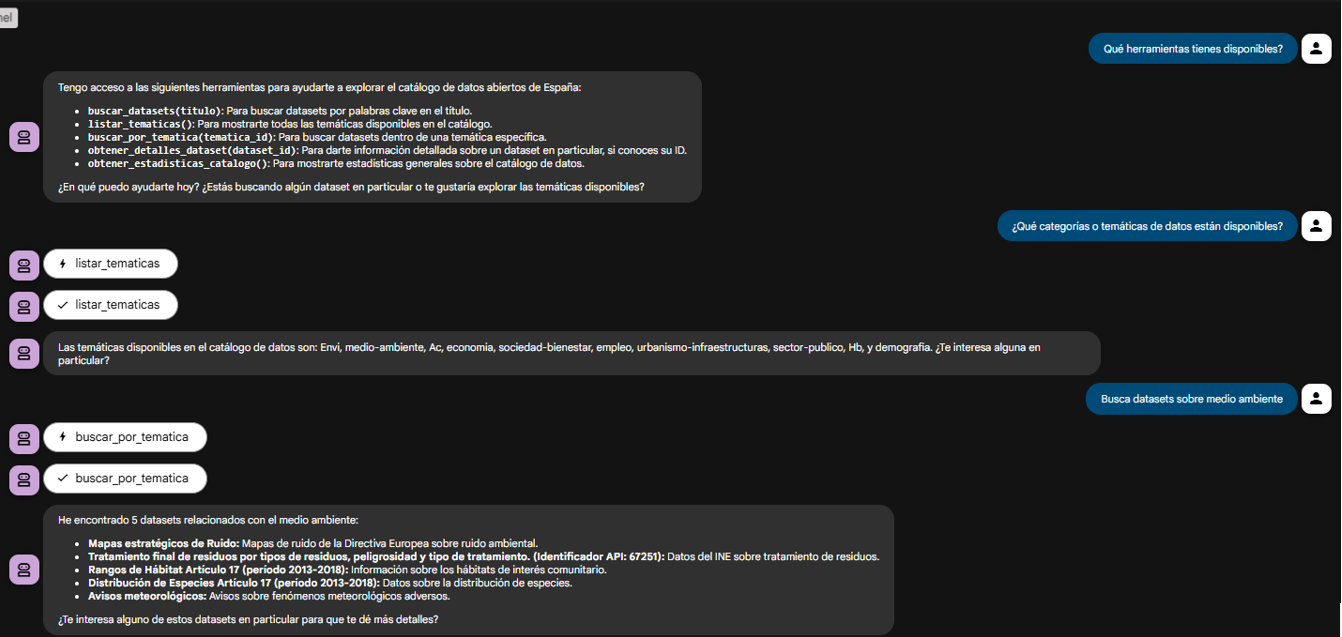
Figure 2. Screenshot of the agent showing its tools.
The true power of decoupling becomes evident when the agent logically chains together the tools provided by our server.
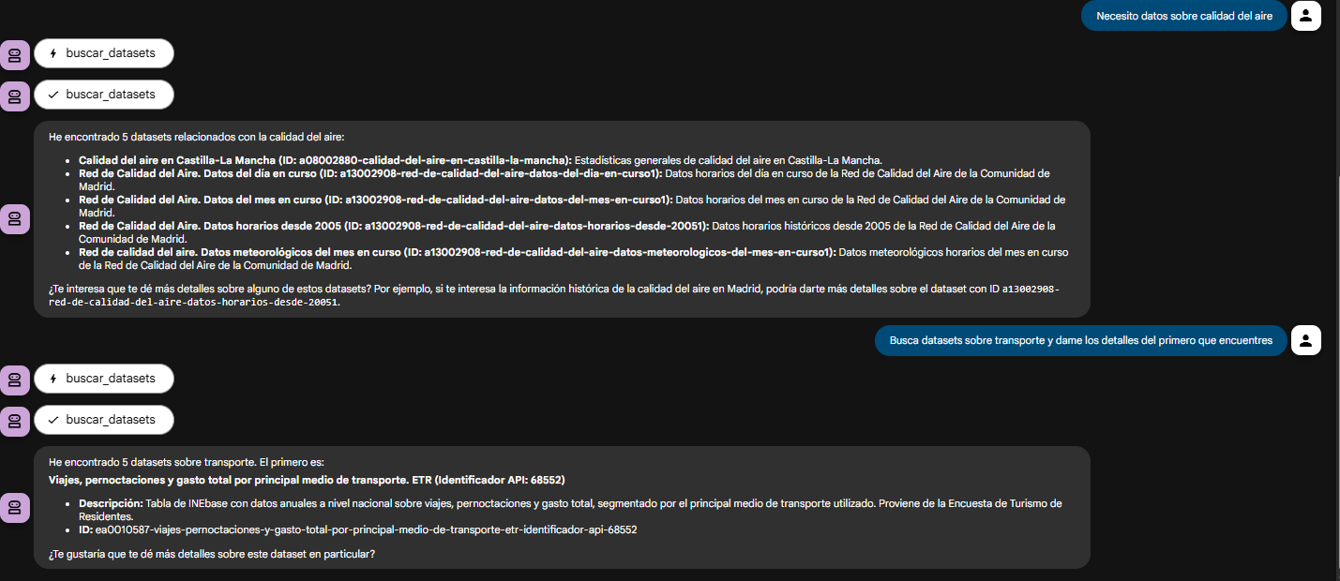
Figure 3. Screenshot of the agent showing the joint use of tools.
What can we learn?
The goal of this exercise is to learn the fundamentals of a modern agent architecture, focusing on the tool server. Specifically:
- How to build an MCP server: how to create a tool server from scratch that speaks MCP, using decorators such as
@mcp.tool. - The decoupled architecture pattern: the fundamental pattern of separating the “brain” (LLM) from the “tools” (business logic).
- Dynamic tool discovery: how an agent (in this case, an ADK agent) can dynamically connect to an MCP server to discover and use tools.
- External API integration: the process of “wrapping” a complex API (such as datos.gob.es) in simple functions within a tool server.
- Orchestration with Docker: how to manage a microservices project for development.
Conclusions and future work
We have built a robust and functional MCP tool server. The real value of this exercise lies in the how: a scalable architecture centered around a tool server that speaks a standard protocol.
This MCP-based architecture is incredibly flexible. The datos.gob.es use case is just one example. We could easily:
- Change the use case: replace
server.pywith one that connects to an internal database or the Spotify API, and any agent that speaks MCP (not just ADK) could use it. - Change the “brain”: swap the ADK agent for a LangChain agent or any other MCP client, and our tool server would continue to work unchanged.
For those interested in taking this work to the next level, the possibilities focus on improving the MCP server:
- Implement more tools: add filters by format, publisher, or date to the MCP server.
- Integrate caching: use Redis in the MCP server to cache API responses and improve speed.
- Add persistence: store chat history in a database (this would be on the agent side).
Beyond these technical improvements, this architecture opens the door to many applications across very different contexts.
- Journalists and academics can have research assistants that help them discover relevant datasets in seconds.
- Transparency organizations can build monitoring tools that automatically detect new publications of public procurement or budget data.
- Consulting firms and business intelligence teams can develop systems that cross-reference information from multiple government sources to produce sector reports.
- Even in education, this architecture serves as a didactic foundation for teaching advanced concepts such as asynchronous programming, API integration, and AI agent design.
The pattern we have built—a decoupled tool server that speaks a standard protocol—is the foundation on which you can develop solutions tailored to your specific needs, regardless of the domain or data source you are working with.


Comments