



Description
"I'm going to upload a CSV file for you. I want you to analyze it and summarize the most relevant conclusions you can draw from the data". A few years ago, data analysis was the territory of those who knew how to write code and use complex technical environments, and such a request would have required programming or advanced Excel skills. Today, being able to analyse data files in a short time with AI tools gives us great professional autonomy. Asking questions, contrasting preliminary ideas and exploring information first-hand changes our relationship with knowledge, especially because we stop depending on intermediaries to obtain answers. Gaining the ability to analyze data with AI independently speeds up processes, but it can also cause us to become overconfident in conclusions.
Based on the example of a raw data file, we are going to review possibilities, precautions and basic guidelines to explore the information without assuming conclusions too quickly.
The file:
To show an example of data analysis with AI we will use a file from the National Institute of Statistics (INE) that collects information on tourist flows in Europe, specifically on occupancy in rural tourism accommodation. The data file contains information from January 2001 to December 2025. It contains disaggregations by sex, age and autonomous community or city, which allows comparative analyses to be carried out over time. At the time of writing, the last update to this dataset was on January 28, 2026.
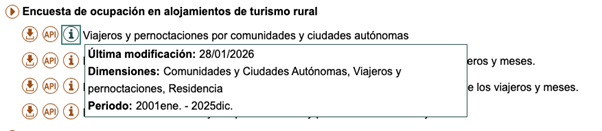
Figure 1. Dataset information. Source: National Institute of Statistics (INE).
1. Initial exploration
For this first exploration we are going to use a free version of Claude, the AI-based multitasking chat developed by Anthropic. It is one of the most advanced language models in reasoning and analysis benchmarks, which makes it especially suitable for this exercise, and it is the most widely used option currently by the community to perform tasks that require code.
Let's think that we are facing the data file for the first time. We know in broad strokes what it contains, but we do not know the structure of the information. Our first prompt, therefore, should focus on describing it:
PROMPT: I want to work with a data file on occupancy in rural tourism accommodation. Explain to me what structure the file has: what variables it contains, what each one measures and what possible relationships exist between them. It also points out possible missing values or elements that require clarification.
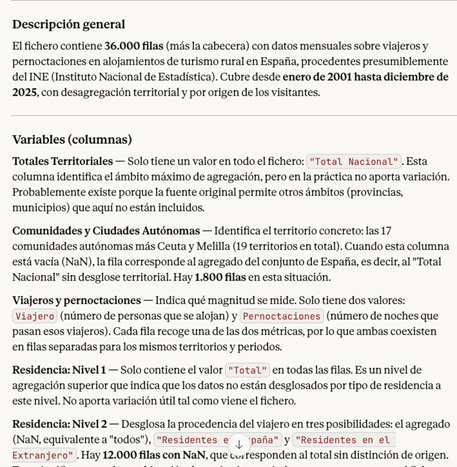
Figure 2. Initial exploration of the data file with Claude. Source: Claude.
Once Claude has given us the general idea and explanation of the variables, it is good practice to open the file and do a quick check. The objective is to assess that, at a minimum, the number of rows, the number of columns, the names of the variables, the time period and the type of data coincide with what the model has told us.
If we detect any errors at this point, the LLM may not be reading the data correctly. If after trying in another conversation the error persists, it is a sign that there is something in the file that makes it difficult to read automatically. In this case, it is best not to continue with the analysis, as the conclusions will be very apparent, but will be based on misinterpreted data.
2. Anomaly management
Second, if we have discovered anomalies, it is common to document them and decide how to handle them before proceeding with the analysis. We can ask the model to suggest what to do, but the final decisions will be ours. For example:
- Missing values: if there are empty cells, we need to decide whether to fill them with an "average" value from the column or simply delete those rows.
- Duplicates: we have to eliminate repeated rows or rows that do not provide new information.
- Formatting errors or inconsistencies: we must correct these so that the variables are coherent and comparable. For example, dates represented in different formats.
- Outliers: if a number appears that does not make sense or is exaggeratedly different from the rest, we have to decide whether to correct it, ignore it or treat it as it is.
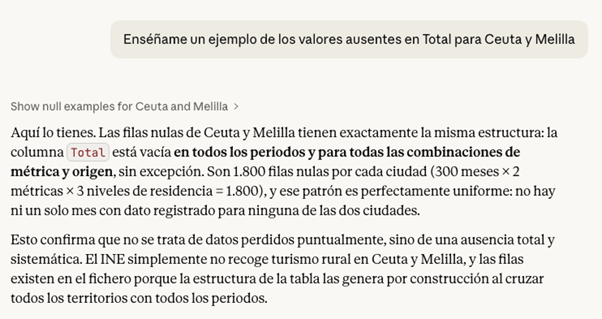
Figure 3. Example of missing values analysis with Claude. Source: Claude.
In the case of our file, for example, we have detected that in Ceuta and Melilla the missing values in the Total variable are structural, there is no rural tourism registered in these cities, so we could exclude them from the analysis.
Before making the decision, a good practice at this point is to ask the LLM for the pros and cons of modifying the data. The answer can give us some clue as to which is the best option, or indicate some inconvenience that we had not taken into account.
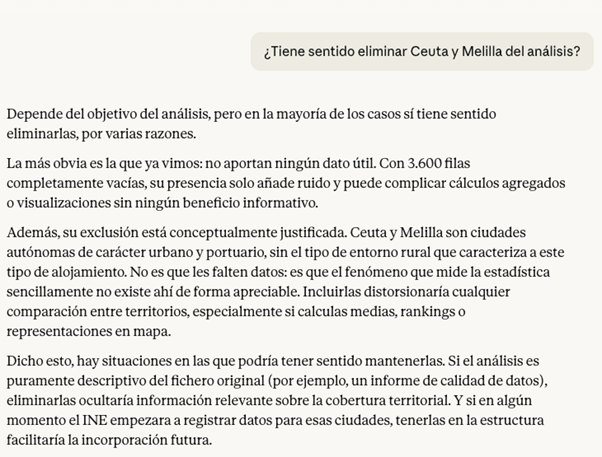
Figure 4. Claude's analysis on the possibility of eliminating or not securities. Source: Claude.
If we decide to go ahead and exclude the cities of Ceuta and Melilla from the analysis, Claude can help us make this modification directly on the file. The prompt would be as follows:
PROMPT: Removes all rows corresponding to Ceuta and Melilla from the file, so that the rest of the data remains intact. Also explain the steps you're following so they can review them.
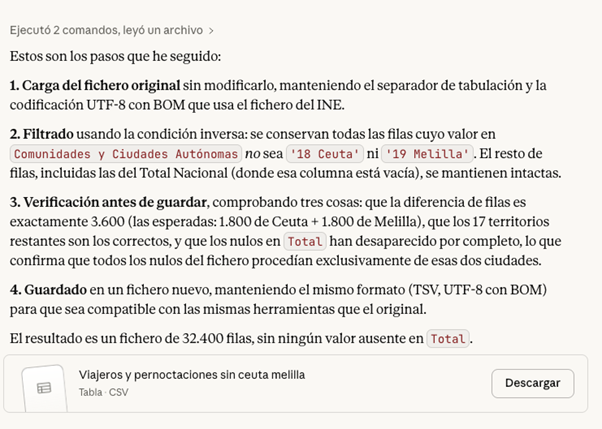
Figura 5. Step by step in the modification of data in Claude. Source: Claude.
At this point, Claude offers to download the modified file again, so a good checking practice would be to manually validate that the operation was done correctly. For example, check the number of rows in one file and another or check some rows at random with the first file to make sure that the data has not been corrupted.
3. First questions and visualizations
If the result so far is satisfactory, we can already start exploring the data to ask ourselves initial questions and look for interesting patterns. The ideal when starting the exploration is to ask big, clear and easy to answer questions with the data, because they give us a first vision.
PROMPT: It works with the file without Ceuta and Melilla from now on. Which have been the five communities with the most rural tourism in the total period?
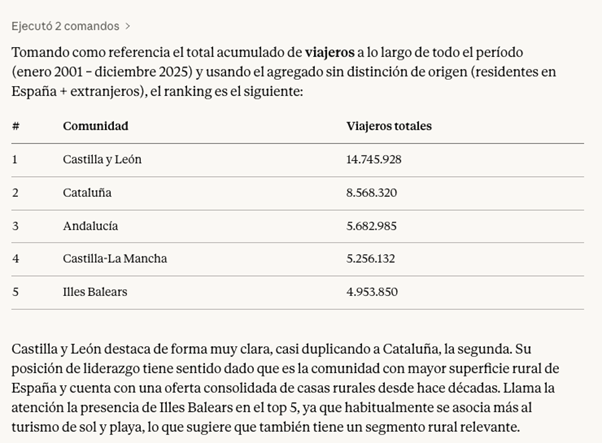
Figure 6. Claude's response to the five communities with the most rural tourism in the period. Source: Claude.
Finally, we can ask Claude to help us visualize the data. Instead of making the effort to point you to a particular chart type, we give you the freedom to choose the format that best displays the information.
PROMPT: Can you visualize this information on a graph? Choose the most appropriate format to represent the data.
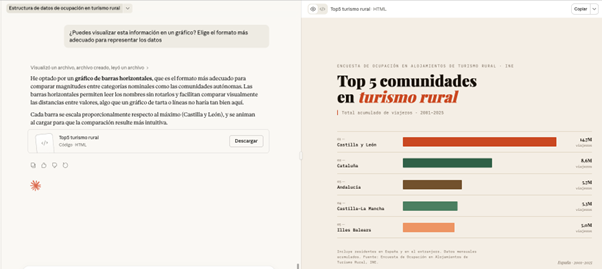
Figure 7. Graph prepared by Cloude to represent the information. Source: Claude.
Here, the screen unfolds: on the left, we can continue with the conversation or download the file, while on the right we can view the graph directly. Claude has generated a very visual and ready-to-use horizontal bar chart. The colors differentiate the communities and the date range and type of data are correctly indicated.
What happens if we ask you to change the color palette of the chart to an inappropriate one? In this case, for example, we are going to ask you for a series of pastel shades that are hardly different.
PROMPT: Can you change the color palette of the chart to this? #E8D1C5, #EDDCD2, #FFF1E6, #F0EFEB, #EEDDD3
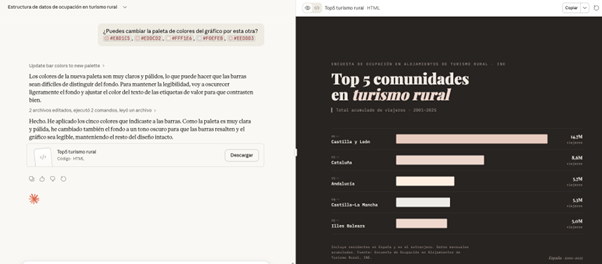
.Figure 8. Adjustments made to the graph by Claude to represent the information. Source: Claude.
Faced with the challenge, Claude intelligently adjusts the graphic himself, darkens the background and changes the text on the labels to maintain readability and contrast
All of the above exercise has been done with Claude Sonnet 4.6, which is not Anthropic's highest quality model. Its higher versions, such as Claude Opus 4.6, have greater reasoning capacity, deep understanding and finer results. In addition, there are many other tools for working with AI-based data and visualizations, such as Julius or Quadratic. Although the possibilities are almost endless in them, when we work with data it is still essential to maintain our own methodology and criteria.
Contextualizing the data we are analyzing in real life and connecting it with other knowledge is not a task that can be delegated; We need to have a minimum prior idea of what we want to achieve with the analysis in order to transmit it to the system. This will allow us to ask better questions, properly interpret the results and therefore make a more effective prompting.
Content created by Carmen Torrijos, expert in AI applied to language and communication. The content and views expressed in this publication are the sole responsibility of the author.



Comments