


Documentación
1. Introduction
Visualisations are graphical representations of data that allow to communicate, in a simple and effective way, the information linked to the data. The visualisation possibilities are very wide ranging, from basic representations such as line graphs, bar charts or relevant metrics, to interactive dashboards.
In this section of "Step-by-Step Visualisations we are regularly presenting practical exercises making use of open data available at datos.gob.es or other similar catalogues. They address and describe in a simple way the steps necessary to obtain the data, carry out the relevant transformations and analyses, and finally draw conclusions, summarizing the information.
Documented code developments and free-to-use tools are used in each practical exercise. All the material generated is available for reuse in the GitHub repository of datos.gob.es.
In this particular exercise, we will explore the current state of electric vehicle penetration in Spain and the future prospects for this disruptive technology in transport.
Access the data lab repository on Github.
Run the data pre-processing code on Google Colab.
In this video (available with English subtitles), the author explains what you will find both on Github and Google Colab.
2. Context: why is the electric vehicle important?
The transition towards more sustainable mobility has become a global priority, placing the electric vehicle (EV) at the centre of many discussions on the future of transport. In Spain, this trend towards the electrification of the car fleet not only responds to a growing consumer interest in cleaner and more efficient technologies, but also to a regulatory and incentive framework designed to accelerate the adoption of these vehicles. With a growing range of electric models available on the market, electric vehicles represent a key part of the country's strategy to reduce greenhouse gas emissions, improve urban air quality and foster technological innovation in the automotive sector.
However, the penetration of EVs in the Spanish market faces a number of challenges, from charging infrastructure to consumer perception and knowledge of EVs. Expansion of the freight network, together with supportive policies and fiscal incentives, are key to overcoming existing barriers and stimulating demand. As Spain moves towards its sustainability and energy transition goals, analysing the evolution of the electric vehicle market becomes an essential tool to understand the progress made and the obstacles that still need to be overcome.
3. Objective
This exercise focuses on showing the reader techniques for the processing, visualisation and advanced analysis of open data using Python. We will adopt a "learning-by-doing" approach so that the reader can understand the use of these tools in the context of solving a real and topical challenge such as the study of EV penetration in Spain. This hands-on approach not only enhances understanding of data science tools, but also prepares readers to apply this knowledge to solve real problems, providing a rich learning experience that is directly applicable to their own projects.
The questions we will try to answer through our analysis are:
- Which vehicle brands led the market in 2023?
- Which vehicle models were the best-selling in 2023?
- What market share will electric vehicles absorb in 2023?
- Which electric vehicle models were the best-selling in 2023?
- How have vehicle registrations evolved over time?
- Are we seeing any trends in electric vehicle registrations?
- How do we expect electric vehicle registrations to develop next year?
- How much CO2 emission reduction can we expect from the registrations achieved over the next year?
4. Resources
To complete the development of this exercise we will require the use of two categories of resources: Analytical Tools and Datasets.
4.1. Dataset
To complete this exercise we will use a dataset provided by the Dirección General de Tráfico (DGT) through its statistical portal, also available from the National Open Data catalogue (datos.gob.es). The DGT statistical portal is an online platform aimed at providing public access to a wide range of data and statistics related to traffic and road safety. This portal includes information on traffic accidents, offences, vehicle registrations, driving licences and other relevant data that can be useful for researchers, industry professionals and the general public.
In our case, we will use their dataset of vehicle registrations in Spain available via:
- Open Data Catalogue of the Spanish Government.
- Statistical portal of the DGT.
Although during the development of the exercise we will show the reader the necessary mechanisms for downloading and processing, we include pre-processed data
in the associated GitHub repository, so that the reader can proceed directly to the analysis of the data if desired.
*The data used in this exercise were downloaded on 04 March 2024. The licence applicable to this dataset can be found at https://datos.gob.es/avisolegal.
4.2. Analytical tools
- Programming language: Python - a programming language widely used in data analysis due to its versatility and the wide range of libraries available. These tools allow users to clean, analyse and visualise large datasets efficiently, making Python a popular choice among data scientists and analysts.
- Platform: Jupyter Notebooks - ia web application that allows you to create and share documents containing live code, equations, visualisations and narrative text. It is widely used for data science, data analytics, machine learning and interactive programming education.
-
Main libraries and modules:
- Data manipulation: Pandas - an open source library that provides high-performance, easy-to-use data structures and data analysis tools.
- Data visualisation:
- Matplotlib: a library for creating static, animated and interactive visualisations in Python..
- Seaborn: a library based on Matplotlib. It provides a high-level interface for drawing attractive and informative statistical graphs.
- Statistics and algorithms:
- Statsmodels: a library that provides classes and functions for estimating many different statistical models, as well as for testing and exploring statistical data.
- Pmdarima: a library specialised in automatic time series modelling, facilitating the identification, fitting and validation of models for complex forecasts.
5. Exercise development
It is advisable to run the Notebook with the code at the same time as reading the post, as both didactic resources are complementary in future explanations
The proposed exercise is divided into three main phases.
5.1 Initial configuration
This section can be found in point 1 of the Notebook.
In this short first section, we will configure our Jupyter Notebook and our working environment to be able to work with the selected dataset. We will import the necessary Python libraries and create some directories where we will store the downloaded data.
5.2 Data preparation
This section can be found in point 2 of the Notebookk.
All data analysis requires a phase of accessing and processing to obtain the appropriate data in the desired format. In this phase, we will download the data from the statistical portal and transform it into the format Apache Parquet format before proceeding with the analysis.
Those users who want to go deeper into this task, please read this guide Practical Introductory Guide to Exploratory Data Analysis.
5.3 Data analysis
This section can be found in point 3 of the Notebook.
5.3.1 Análisis descriptivo
In this third phase, we will begin our data analysis. To do so,we will answer the first questions using datavisualisation tools to familiarise ourselves with the data. Some examples of the analysis are shown below:
- Top 10 Vehicles registered in 2023: In this visualisation we show the ten vehicle models with the highest number of registrations in 2023, also indicating their combustion type. The main conclusions are:
- The only European-made vehicles in the Top 10 are the Arona and the Ibiza from Spanish brand SEAT. The rest are Asians.
- Nine of the ten vehicles are powered by gasoline.
- The only vehicle in the Top 10 with a different type of propulsion is the DACIA Sandero LPG (Liquefied Petroleum Gas).
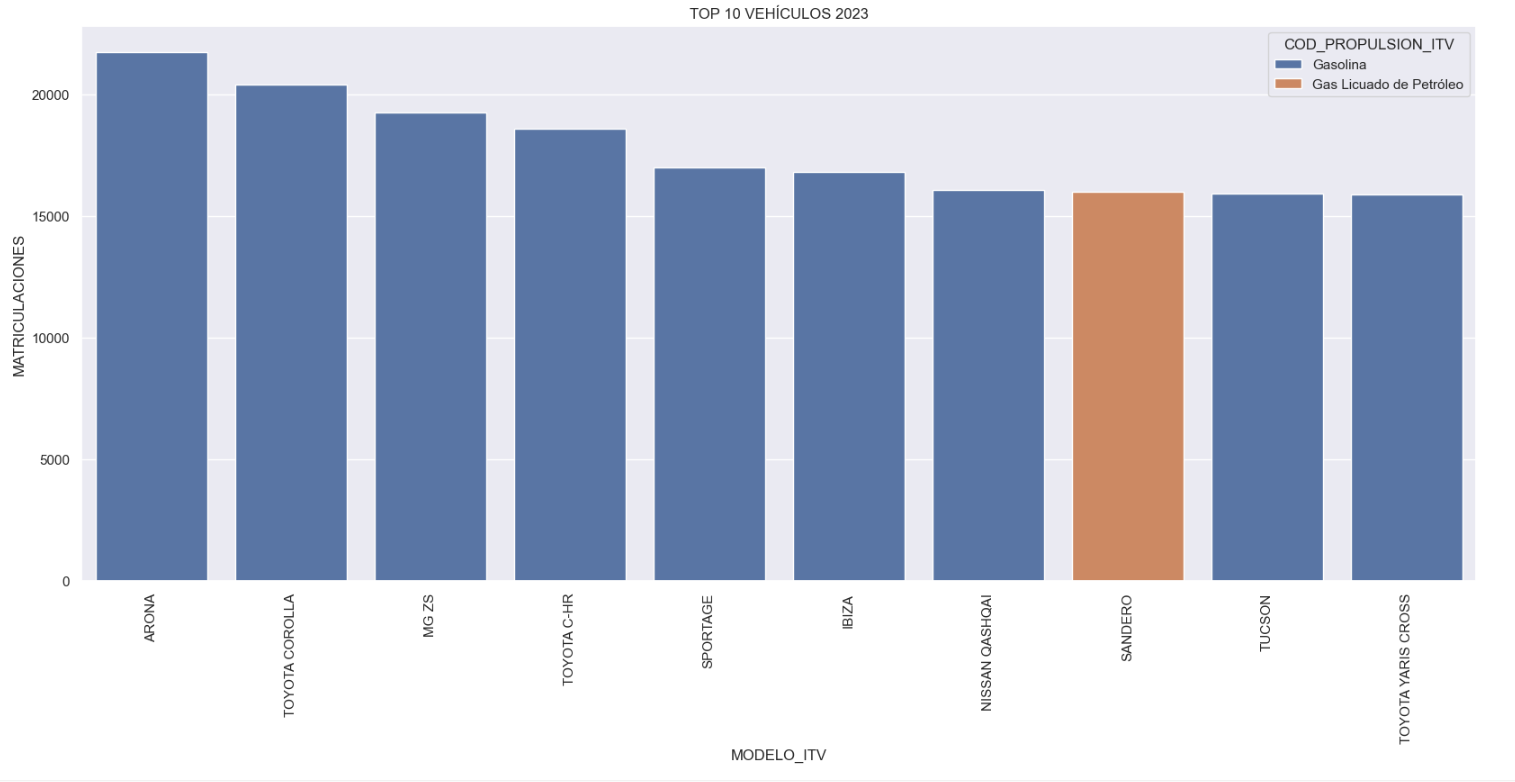
Figure 1. Graph "Top 10 vehicles registered in 2023"
- Market share by propulsion type: In this visualisation we represent the percentage of vehicles registered by each type of propulsion (petrol, diesel, electric or other). We see how the vast majority of the market (>70%) was taken up by petrol vehicles, with diesel being the second choice, and how electric vehicles reached 5.5%.
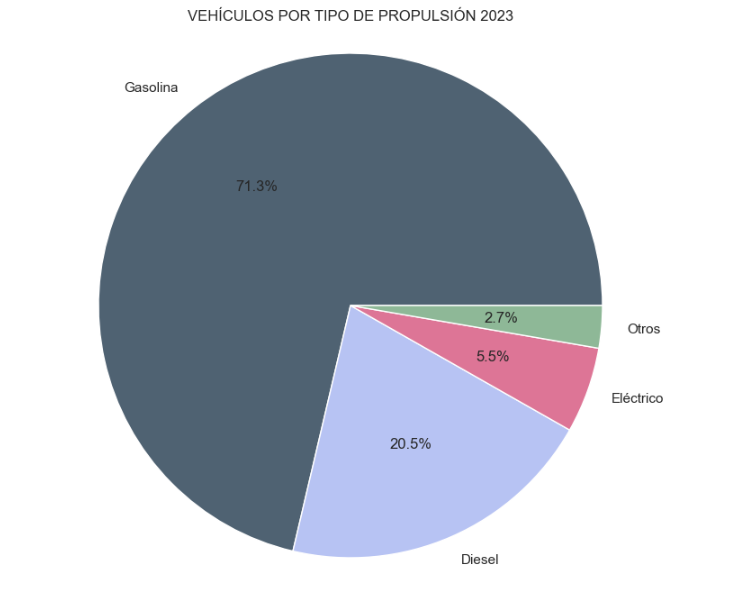
Figure 2. Graph "Market share by propulsion type".
- Historical development of registrations: This visualisation represents the evolution of vehicle registrations over time. It shows the monthly number of registrations between January 2015 and December 2023 distinguishing between the propulsion types of the registered vehicles, and there are several interesting aspects of this graph:
- We observe an annual seasonal behaviour, i.e. we observe patterns or variations that are repeated at regular time intervals. We see recurring high levels of enrolment in June/July, while in August/September they decrease drastically. This is very relevant, as the analysis of time series with a seasonal factor has certain particularities.
-
The huge drop in registrations during the first months of COVID is also very remarkable.
-
We also see that post-covid enrolment levels are lower than before.
-
Finally, we can see how between 2015 and 2023 the registration of electric vehicles is gradually increasing.
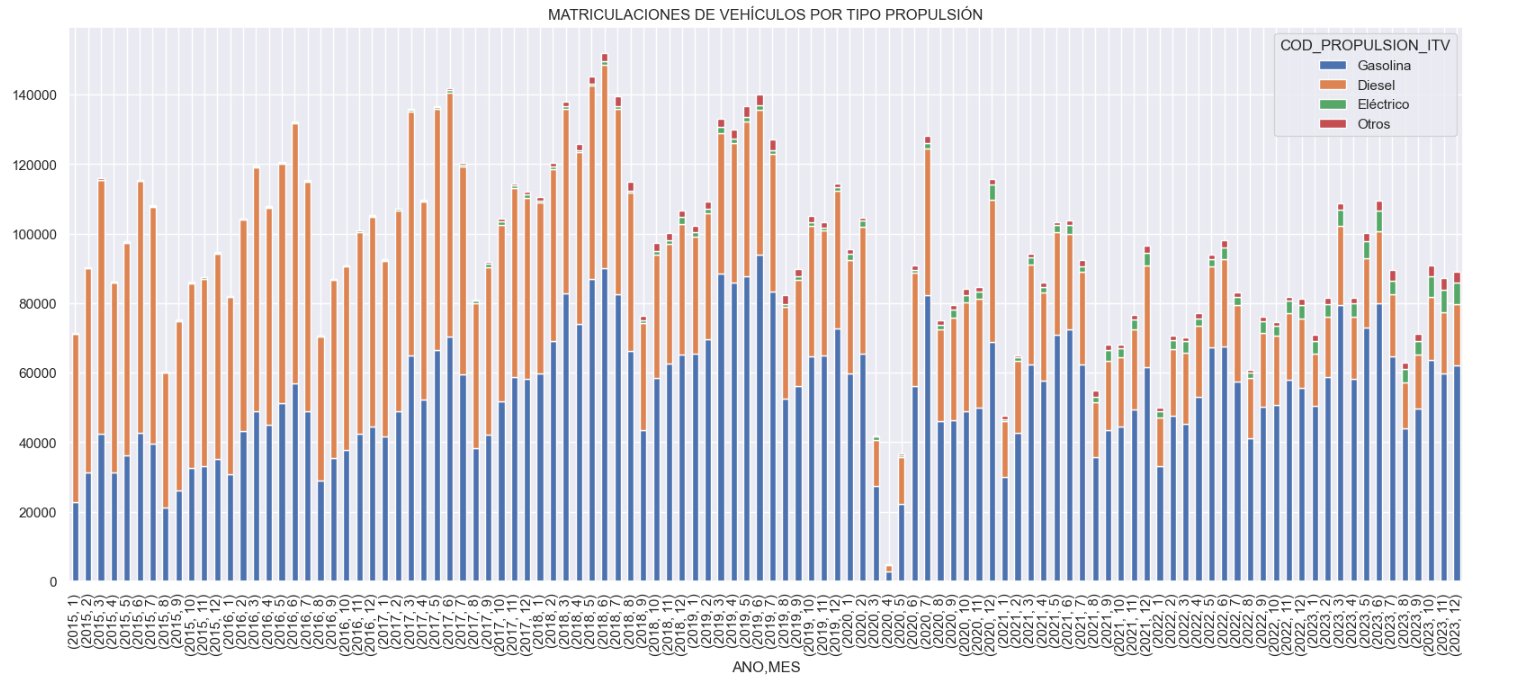
Figure 3. Graph "Vehicle registrations by propulsion type".
- Trend in the registration of electric vehicles: We now analyse the evolution of electric and non-electric vehicles separately using heat maps as a visual tool. We can observe very different behaviours between the two graphs. We observe how the electric vehicle shows a trend of increasing registrations year by year and, despite the COVID being a halt in the registration of vehicles, subsequent years have maintained the upward trend.
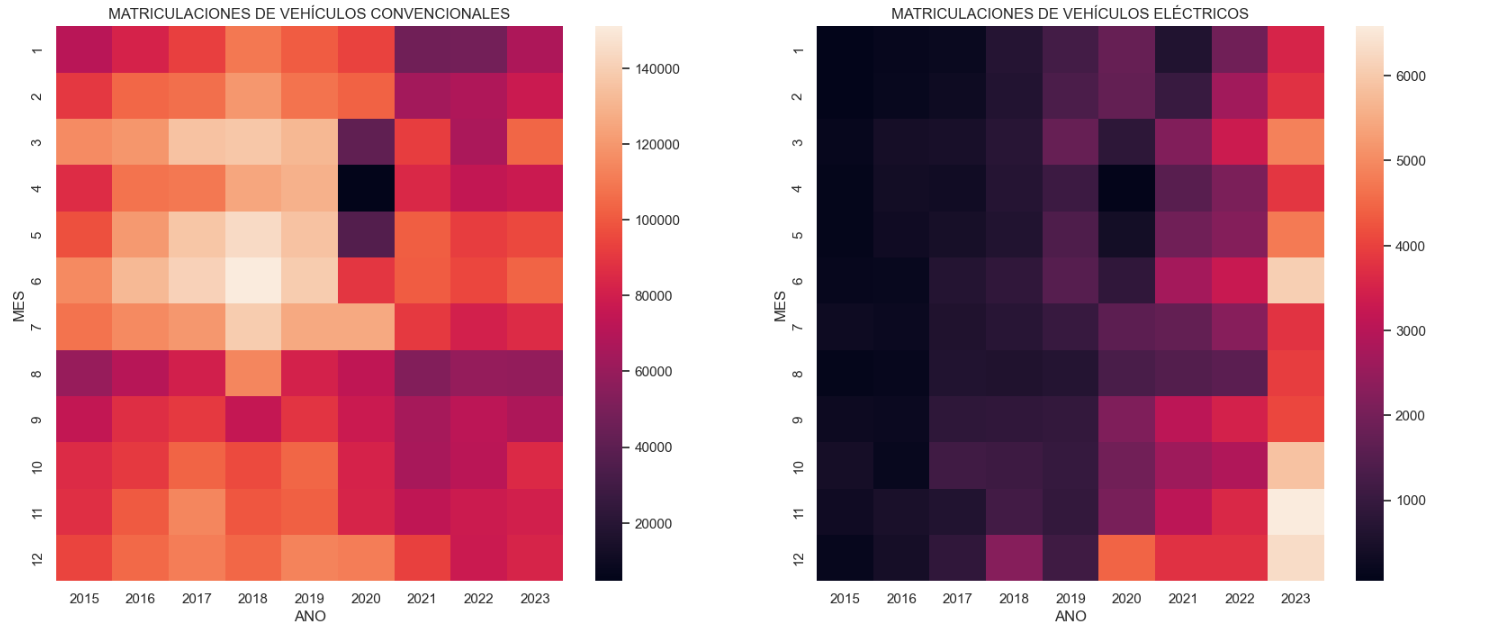
Figure 4. Graph "Trend in registration of conventional vs. electric vehicles".
5.3.2. Predictive analytics
To answer the last question objectively, we will use predictive models that allow us to make estimates regarding the evolution of electric vehicles in Spain. As we can see, the model constructed proposes a continuation of the expected growth in registrations throughout the year of 70,000, reaching values close to 8,000 registrations in the month of December 2024 alone.
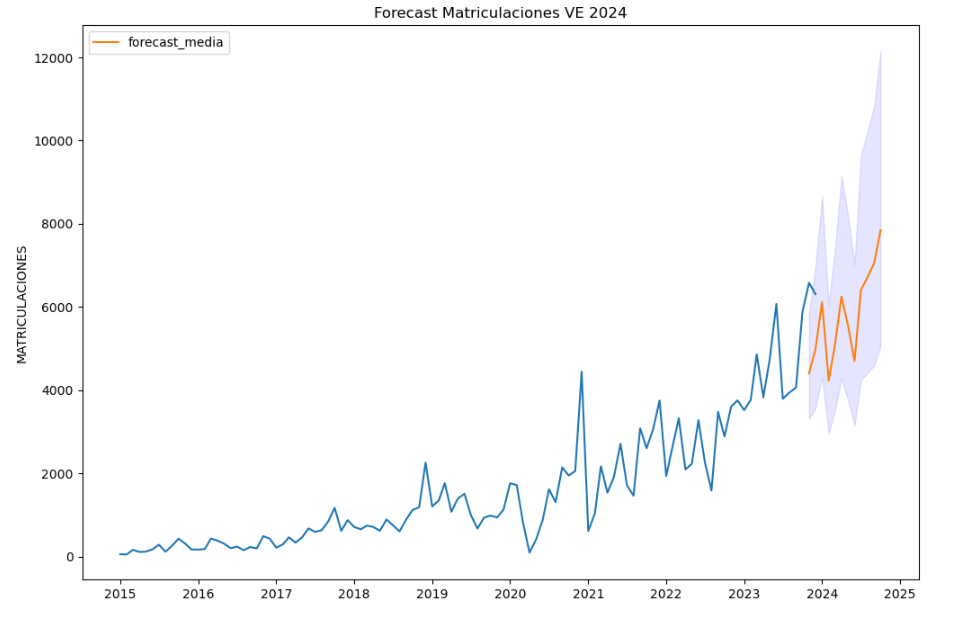
Figure 5. Graph "Predicted electric vehicle registrations".
5. Conclusions
As a conclusion of the exercise, we can observe, thanks to the analysis techniques used, how the electric vehicle is penetrating the Spanish vehicle fleet at an increasing speed, although it is still at a great distance from other alternatives such as diesel or petrol, for now led by the manufacturer Tesla. We will see in the coming years whether the pace grows at the level needed to meet the sustainability targets set and whether Tesla remains the leader despite the strong entry of Asian competitors.
6. Do you want to do the exercise?
If you want to learn more about the Electric Vehicle and test your analytical skills, go to this code repository where you can develop this exercise step by step.
Also, remember that you have at your disposal more exercises in the section "Step by step visualisations" "Step-by-step visualisations" section.
Content elaborated by Juan Benavente, industrial engineer and expert in technologies linked to the data economy. The contents and points of view reflected in this publication are the sole responsibility of the author.

Blog
In the digital age, data has become an invaluable tool in almost all areas of society, and the world of sport is no exception. The availability of data related to this field can have a positive impact on the promotion of health and wellbeing, as well as on the improvement of physical performance of both athletes and citizens in general. Moreover, its benefits are also evident in the economic sphere, as this data can be used to publicise the sports offer or to generate new services, among other things.
Here are three examples of their impact.
Promoting an active and healthy lifestyle
The availability of public information can inspire citizens to participate in physical activity and sport, both by providing examples of its health benefits and by facilitating access to opportunities that suit their individual preferences and needs.
An example of the possibilities of open data in this field can be found in the project OpenActive. It is an initiative launched in 2016 by the Open Data Institute (ODI) together with Sport England, a public body aimed at encouraging physical activity for everyone in England. OpenActive allows sport providers to publish standardised open data, based on a standard developed by the ODI to ensure quality, interoperability and reliability. These data have enabled the development of tools to facilitate the search for and booking of activities, thus helping to combat citizens' physical inactivity. According to an external impact assessment, this project could have helped prevent up to 110 premature deaths, saved up to £3 million in healthcare costs and generated up to £20 million in productivity gains per year. In addition, it has had a major economic impact for the operators participating that share their data by increasing their customers and thus their profits.
Optimisation of physical work
The data provides teams, coaches and athletes with access to a wealth of information about competitions and their performance, allowing them to conduct detailed analysis and find ways to improve. This includes data on game statistics, health, etc.
In this respect, the French National Agency for Sport, together with the National Institute for Sport, Experience and Performance (INSEP) and the General Directorate for Sport, have developed the Sport Data Hub - FFS. The project was born in 2020 with the idea of boosting the individual and collective performance of French sport in the run-up to the Olympic Games in Pays 2024. It consists of the creation of a collaborative tool for all those involved in the sports movement (federations, athletes, coaches, technical teams, institutions and researchers) to share data that allows for aggregate comparative analysis at national and international level.
Research to understand the impact of data in areas such as health and the economy
Data related to physical activity can also be used in scientific research to analyse the effects of exercise on health and help prevent injury or disease. They can also help us to understand the economic impact of sporting activities.
As an example, in 2021 the European Commission launched the report Mapping of sport statistics and data in the EU, with data on the economic and social impact of sport, both at EU and member state level, between 2012 and 2021. The study identifies available data sources and collects quantitative and qualitative data. These data are used to compile a series of indicators of the impact of sport on the economy and society, including an entire section focusing on health.
This type of study can be used by public bodies to develop policies to promote these activities and to provide citizens with sport-related services and resources adapted to their specific needs. A measure that could help to prevent diseases and thus save on health costs.
Where to find open data related to sport?
In order to carry out these projects, reliable data sources are needed. At datos.gob.es you can find various datasets on this topic. Most of them have been published by local administrations and refer to sports facilities and equipment, as well as events of this nature.
Within the National Catalogue, DEPORTEData stands out. It is a database of the Ministry of Education, Vocational Training and Sport for the storage and dissemination of statistical results in the field of sport. Through their website they offer magnitudes structured in two large blocks:
- Cross-sectional estimates on employment and enterprises, expenditure by households and public administration, education, foreign trade and tourism, all linked to sport.
- Sector-specific information, including indicators on federated sport, coach training, doping control, sporting habits, facilities and venues, as well as university and school championships.
At the European level, we can visit the European Open Data Portal (data.europa.eu), with more than 40,000 datasets on sport, or Eurostat. And if we want to take a closer look at citizens' behaviour, we can go to the Eurobarometer on sport and physical activity, whose data can also be found on data.europa.eu. Similarly, at the global level, the World Health Organisation provides datasets on the effects of physical inactivity.
In conclusion, there is a need to promote the openness of quality, up-to-date and reliable data on sport. Information with a great impact not only for society, but also for the economy, and can help us improve the way we participate, compete and enjoy sport.
Noticia
Between 2 April and 16 May, applications for the call on aid for the digital transformation of strategic productive sectors may be submitted at the electronic headquarters of the Ministry for Digital Transformation and Civil Service. Order TDF/1461/2023, of 29 December, modified by Order TDF/294/2024, regulates grants totalling 150 million euros for the creation of demonstrators and use cases, as part of a more general initiative of Sectoral Data Spaces Program, promoted by the State Secretary for Digitalisation and Artificial Intelligence and framed within the Recovery, Transformation and Resilience Plan (PRTR). The objective is to finance the development of data spaces and the promotion of disruptive innovation in strategic sectors of the economy, in line with the strategic lines set out in the Digital Spain Agenda 2026.
Lines, sectors and beneficiaries
The current call includes funding lines for experimental development projects in two complementary areas of action: the creation of demonstration centres (development of technological platforms for data spaces); and the promotion of specific use cases of these spaces. This call is addressed to all sectors except tourism, which has its own call. Beneficiaries may be single entities with their own legal personality, tax domicile in the European Union, and an establishment or branch located in Spain. In the case of the line for demonstration centres, they must also be associative or representative of the value chains of the productive sectors in territorial areas, or with scientific or technological domains.
Infographic-summary
The following infographics show the key information on this call for proposals:

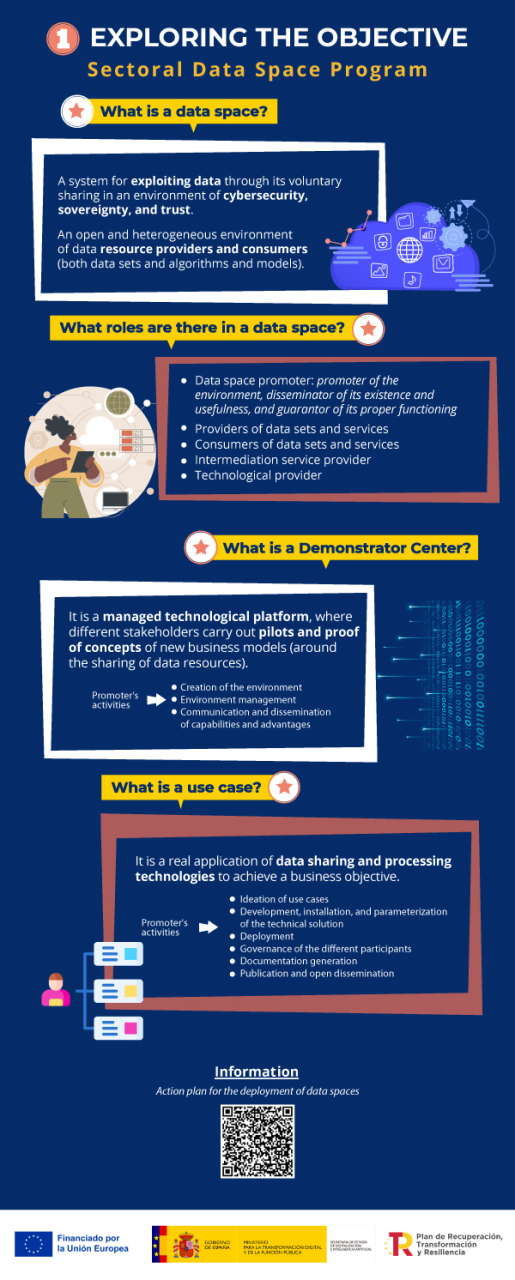
Would you like more information?
- Access to the grant portal for application proposals in the following link. On the portal you will find the regulatory bases and the call for applications, a summary of its content, documentation and informative material with presentations and videos, as well as a complete list of questions and answers. In the mailbox espaciosdedatos@digital.gob.es you will get help about the call and the application procedure. From this portal you can access the electronic office for the application.
- Quick guide to the call for proposals in pdf + downloadable Infographics (on the Sectoral Data Program and Technical Information)
- Link to other documents of interest:
- Additional information on the data space concept
Blog
Open data provides relevant information on the state and evolution of different sectors, including employment. Employment data typically includes labour force statistics and information on employees, as well as economic, demographic or benefits-related data, interviews, salaries, vacancies, etc.
This information can provide a clear picture of a country's economic health and the well-being of its citizens, encouraging informed decision-making. In addition, they can also serve as a basis for the creation of innovative solutions to assist in a variety of tasks.
In this article we will review some sources of open data on job quality, as well as examples of use to show the potential benefits of re-use.
Where to find employment data?
In datos.gob.es a large number of data sets on employment are available, with the National Statistics Institute (INE) standing out as the national publisher. Thanks to the INE data, we can find out who is employed by sector of activity, type of studies or working day, as well as the reasons for having a part-time job. The data provided by this entity also allows us to know the employment situation of people with disabilities or by sex.
Other sources of data where you can find information of interest is the State Public Employment Service (sepe.es), where you can find statistical data on job seekers, jobs and placements, from May 2005 to the present day. To this must be added the regional bodies, many of which have launched their own open employment data portal. This is the case of the Junta de Andalucía.
If we are interested in making a comparison between countries, we can also turn to data from the OECD, Eurostat or the World Bank.
All these data can be of great interest to:
- Policy makers, to better understand and react to labour market dynamics.
- Employers, to optimise their recruitment activities.
- Job seekers, to make better career choices.
- Education and training institutions, to adapt curricula to the needs of the labour market.
Use cases of open data in the employment sector
It is just as important to have sources of open employment data as it is to know how to interpret the information they offer about the sector. This is where reusers come in, taking advantage of this raw material to create data products that can respond to different needs. Let's look at some examples:
- Decision-making and implementation of active policies. Active labour market policies are tools that governments use to intervene directly in the labour market, through training, guidance, incentives to hiring, etc. To do so, they need to be aware of market trends and needs. This has led many public bodies to set up observatories, such as the SEPE or the Principality of Asturias. There are also specific observatories for each area, such as the one for Equality and Employment. At the European level, Eurostat's proposal stands out: to establish requirements to create a pan-European system for the production of official statistics and specific policy analyses using open data on online job vacancies. This project has been carried out using the BDTI platform. But this field is not limited to the public sector; other actors can also submit proposals. This is the case of Iseak, a non-profit organisation that promotes a research and transfer centre in economics. Among other questions, Iseak seeks to answer questions such as: does the increase in the minimum wage lead to job destruction or why is there a gender gap in the market?
- Accountability. All this information is not only useful for public bodies, but also for citizens to assess whether their government's employment policies are working. For this reason, many governments, such as Castilla y León, make this data available to citizens through easy-to-understand visualisations. Data journalism also plays a leading role in this field, with pieces that bring information closer to the general public, such as these examples of salaries or the level of unemployment by area. If you want to know how to make this type of visualisations, we explain them in this step-by-step exercise that characterises the demand for employment and hiring registered in Spain.
- Boosting job opportunities. In order to bring information of interest to citizens who are actively seeking employment or new job opportunities, there are tools, such as this app for public employment calls or grants, based on open data. There are also town councils that create solutions to boost employment and the economy in their locality, such as the APP Paterna Empléate. These apps are a much simpler and more user-friendly way of consuming data than traditional job search portals. Barcelona Provincial Council has gone a step further. This tool uses AI applied to open data to, among other purposes, offer personalised services for individuals, companies and rural sectors, as well as access to job offers. The information it offers comes from notice boards, as well as from the Profile of the contracting party and various municipal websites.
- Development of advanced solutions. Employment data can also be used to power a wide variety of machine learning use cases. One example is this US platform for financial analytics that provides data and information to investors and companies. It uses US unemployment rate data, combined with other data such as postcodes, demographics or weather data.
In short, thanks to this type of data we can not only learn more about the employment situation in our environment, but also feed solutions that help boost the economy or facilitate access to job opportunities. It is therefore a category of data whose publication should be promoted by public bodies at all levels.
Noticia
The year is coming to an end and it is a good time to review some of the issues that have marked the open data and data sharing ecosystem in Spain, a community that continues to grow and build alliances for the development of innovative technologies. A synergy that lays the foundations to face an interconnected, digital future full of possibilities.
With 2024 just a few days away, we take stock of the news, events and training of interest that have marked the year behind us. In this compilation we review some regulatory developments, new portals and projects promoted by the public sector, as well as various educational resources and reference documentation that 2023 has left us.
Legal regulation for the development of collaborative environments
During this year, in datos.gob.es we have echoed relevant news in the open data and data sharing sector. All of them have contributed to consolidate the appropriate context for interoperability and the promotion of the value of data in our society. The following is a review of the most relevant announcements:
-
At the beginning of the year, the European Commission published a first list of high-value datasets that are of great value to the economy, the environment and society because of the information they contain. For this reason, member states must make them available to the public by summer 2024. This first list of categories includes geospatial, earth observation and environmental, meteorological, statistical, business and mobility data. On the other hand, at the end of 2023, the same body made a proposal to expand the list of categories of datasets to be considered of high value, adding another seven proposals for categories that could be included in the future: climate loss, energy, financial, public administration and government, health, justice and language.
-
In the first quarter of the year, Law 37/2007 on the reuse of public sector information was amended in light of the latest European Open Data Directive. Now, public administrations will have to comply with, among others, two essential requirements: to focus on the publication of high-value data through APIs and to designate a unit responsible for information to ensure the correct opening of data. These measures are intended to be aligned with the demands of competitiveness and innovation raised by technologies such as AI and with the key role played by data when it comes to configuring data spaces.
-
The publication of the UNE data specifications was another milestone in standardization that marked 2023. The volume of data continues to grow and mechanisms are needed to ensure its proper use and exploitation. To this end, there are:
-
Another noteworthy advance has been the approval of the consolidated wording of the European Data Regulation (Data Act), which seeks to provide harmonized standards for fair access to and use of data. The legal structure that will drive the data economy in the EU is now a reality. The Data Act and the Data Governance Act also passed in 2023 will contribute to the development of a European Digital Single Market.
-
In October 2023 the future Interoperable Europe Act (Interoperable Europe Act) entered the final legislative stage after getting the go-ahead from the member states. The aim of the Interoperable Europe Act is to strengthen interoperability between public sector administrations in the EU and to create digital public services focused on citizens and businesses.
Advances in the open data ecosystem in Spain
In the last year, many public bodies have opted for opening their data in formats suitable for reuse, many of them focused on specific topics, such as meteorology. Some examples are:
-
The Diputación de Segovia premiered an open data portal with information from city councils.
-
The Cabildo de Palma launched a new open and real-time weather data portal that provides information on current and historical weather and air quality.
-
The City Council of Soria also created a georeferenced information viewer that allows to consult parameters such as air quality, noise level, meteorology or traffic of people, among other variables.
-
The Malaga City Council has recently allied with the CSIC to develop a marine observatory that will collect and share open data in real time on coastal activity.
-
Progress on new portals will continue during 2024, as there are city councils that have expressed their interest in developing projects of this type. One example is the City Council of Las Torres de Cotillas: it recently launched a municipal website and a citizen participation portal in which they plan to enable an open data space in the near future.
On the other hand, many institutions that already published open data have been expanding their catalog of datasets throughout the year. This is the case of the Canary Islands Statistics Institute (ISTAC), which has implemented various improvements such as the expansion of its semantic open data catalog to achieve better data and metadata sharing.
Along these lines, more agreements have also been signed to promote the opening and sharing of data, as well as the acquisition of related skills. For example, with universities:
-
The Navarra Open Data portal incorporated information provided by the Public University of Navarra (UPNA) on its structure, activity, economic data and workforce.
-
The University of Valladolid (UVa) has presented a Chair of Transparency and Open Government that will address issues such as data governance, among others.
-
The University of Burgos has implemented an open science policy to foster collaboration and knowledge sharing and provide equal access to scientific and research work.
-
The Carlos III University of Madrid (UC3M) has partnered with the Community of Madrid to establish the Chair on Territorial Dynamism that will promote research and the development of open data analysis activities, among others.
Disruptive solutions using open data
The winning combination of open data and technology has driven the development of multiple initiatives of interest as a result of the efforts of public administrations, such as, for example:
-
The Community of Madrid managed to optimize by 25% the reliability of the prediction of pollen levels in the territory thanks to artificial intelligence and open data. Through the CAM's open data portal, citizens can access an interactive map to find out the level of pollen in the air in their area.
-
The Valencia City Council's Chair of Governance at the Polytechnic University (UPV) published a study that uses open data sources to calculate the carbon footprint by neighborhoods in the city of Valencia.
-
The Xunta de Galicia presented a digital twin project for territorial management that will have information stored in public and private databases.
-
The Consejo Superior de Investigaciones Científicas (CSIC) initiated the TeresIA project for terminology in Spanish that will generate a meta-search engine for access to terminologies of pan-Hispanic scope based on AI and open data.
During 2023, Public Administrations have not only launched technological projects, but have also boosted entrepreneurship around open data with activities such as the Castilla y León Open Data contest. An event in which projects developed with open data as products or services, ideas, data journalism works and didactic resources were awarded.
Trainings and events to keep up with the trends
Educational materials on open data and related technologies have only grown in 2023. We highlight some free and virtual resources that are available:
-
The European Open Data Portal is a reference source in all aspects, also at the training level. Over the last year, it has shared educational resources such as this free course on data visualization, this one on the legal aspects of open data or this one on how to incorporate open data into an application.
-
In 2023, the European Interoperability Academy published a free online short course on open source licensing for which no prior knowledge of the subject is required.
-
In 2023, we have published more practical exercises from the 'Visualizations step by step' series such as this tutorial to learn how to generate a customized tourist map with MyMaps or this analysis of meteorological data using the "ggplot2" library.
In addition, there are many activities that have been carried out in 2023 to promote the data culture. However, if you missed any of them, you can re-watch the online recordings of the following ones:
-
In March, the European Conference on Data and Semantics was broadcast, presenting trends in multilingual data.
-
In September, the 2nd National Open Data Meeting was held under the theme "Urgent Call to Action for the Environment". The event continued the tradition started in 2022 in Barcelona, consolidating itself as one of the main meetings in Spain in the field of public sector data reuse and presenting training materials of interest to the community.
-
In October, the European benchmark interoperability conference SEMIC 2023, Interoperable Europe in the age of AI, was organized in Madrid.
Reports and other reference documents published in 2023
Once we have reviewed the news, initiatives, trainings and events, we would like to highlight a compendium of extensive knowledge such as the set of in-depth reports that have been published in 2023 on the open data sector and innovative technologies. Some noteworthy ones are:
-
The Asociación Multisectorial de la Información (ASEDIE) presented in April 2023 its 11th edition of the Infomediary Sector Report in which it reviews the health of companies working with data, a sector with growth potential. Here you can read the main conclusions.
-
From October 2023 Spain co-chaired the Steering Committee of the Open Government Partnership (OGP), a task that has involved driving OGP initiatives and leading open government thematic areas. This organization presented its global Open Government Partnership report in 2023, a document that highlights good practices such as the publication of large volumes of open data by European countries. In addition, it also identifies several areas for improvement such as the publication of more high-value data (HDV) in reusable and interoperable formats.
-
The Organisation for Economic Co-operation and Development (OECD) published a report on public administration principles in November 2023 in which it highlighted, among others, digitization as a tool for making data-driven decisions and implementing effective and efficient processes.
-
During this year, the European Commission published a report on the integration of data spaces in the European data strategy. Signed by experts in the field, this document lays the groundwork for implementing European dataspaces.
-
On the other hand, the open data working group of the Red de Entidades Locales por la Transparencia y la Participación Ciudadana and the Spanish Federation of Municipalities and Provinces presented a list of the 80 datasets to be published to continue completing the guides published in previous years. You can consult it here.
These are just a few examples of what the open data ecosystem has given of itself in the last year. If you would like to share with datos.gob.es any other news, leave us a comment or send us an email to dinamizacion@datos.gob.es.
Blog
We are currently in the midst of an unprecedented race to master innovations in Artificial Intelligence. Over the past year, the star of the show has been Generative Artificial Intelligence (GenAI), i.e., that which is capable of generating original and creative content such as images, text or music. But advances continue to come and go, and lately news is beginning to arrive suggesting that the utopia of Artificial General Intelligence (AGI) may not be as far away as we thought. We are talking about machines capable of understanding, learning and performing intellectual tasks with results similar to those of the human brain.
Whether this is true or simply a very optimistic prediction, a consequence of the amazing advances achieved in a very short space of time, what is certain is that Artificial Intelligence already seems capable of revolutionizing practically all facets of our society based on the ever-increasing amount of data used to train it.
And the fact is that if, as Andrew Ng argued back in 2017, artificial intelligence is the new electricity, open data would be the fuel that powers its engine, at least in a good number of applications whose main and most valuable source is public information that is accessible for reuse. In this article we will review a field in which we are likely to see great advances in the coming years thanks to the combination of artificial intelligence and open data: artistic creation.
Generative Creation Based on Open Cultural Data
The ability of artificial intelligence to generate new content could lead us to a new revolution in artistic creation, driven by access to open cultural data and a new generation of artists capable of harnessing these advances to create new forms of painting, music or literature, transcending cultural and temporal barriers.
Music
The world of music, with its diversity of styles and traditions, represents a field full of possibilities for the application of generative artificial intelligence. Open datasets in this field include recordings of folk, classical, modern and experimental music from all over the world and from all eras, digitized scores, and even information on documented music theories. From the arch-renowned MusicBrainz, the open music encyclopedia, to datasets opened by streaming industry dominators such as Spotify or projects such as Open Music Europe, these are some examples of resources that are at the basis of progress in this area. From the analysis of all this data, artificial intelligence models can identify unique patterns and styles from different cultures and eras, fusing them to create unpublished musical compositions with tools and models such as OpenAI's MuseNet or Google's Music LM.
Literature and painting
In the realm of literature, Artificial Intelligence also has the potential to make not only the creation of content on the Internet more productive, but to produce more elaborate and complex forms of storytelling. Access to digital libraries that house literary works from antiquity to the present day will make it possible to explore and experiment with literary styles, themes and storytelling archetypes from diverse cultures throughout history, in order to create new works in collaboration with human creativity itself. It will even be possible to generate literature of a more personalized nature to the tastes of more minority groups of readers. The availability of open data such as the Guttemberg Project with more than 70,000 books or the open digital catalogs of museums and institutions that have published manuscripts, newspapers and other written resources produced by mankind, are a valuable resource to feed the learning of artificial intelligence.
The resources of the Digital Public Library of America1 (DPLA) in the United States or Europeana in the European Union are just a few examples. These catalogs not only include written text, but also vast collections of visual works of art, digitized from the collections of museums and institutions, which in many cases cannot even be admired because the organizations that preserve them do not have enough space to exhibit them to the public. Artificial intelligence algorithms, by analyzing these works, discover patterns and learn about artistic techniques, styles and themes from different cultures and historical periods. This makes it possible for tools such as DALL-E2 or Midjourney to create visual works from simple text instructions with aesthetics of Renaissance painting, Impressionist painting or a mixture of both.
However, these fascinating possibilities are accompanied by a still unresolved controversy about copyright that is being debated in academic, legal and juridical circles and that poses new challenges to the definition of authorship and intellectual property. On the one hand, there is the question of the ownership of rights over creations produced by artificial intelligence. On the other hand, there is the use of datasets containing copyrighted works that have been used in the training of models without the consent of the authors. On both issues there are numerous legal disputes around the world and requests for explicit removal of content from the main training datasets.
In short, we are facing a field where the advance of artificial intelligence seems unstoppable, but we must be very aware not only of the opportunities, but also of the risks involved.
Content prepared by Jose Luis Marín, Senior Consultant in Data, Strategy, Innovation & Digitalization. The contents and points of view reflected in this publication are the sole responsibility of its author.
Blog
IATE, which stands for Interactive Terminology for Europe, is a dynamic database designed to support the multilingual drafting of European Union texts. It aims to provide relevant, reliable and easily accessible data with a distinctive added value compared to other sources of lexical information such as electronic archives, translation memories or the Internet.
This tool is of interest to EU institutions that have been using it since 2004 and to anyone, such as language professionals or academics, public administrations, companies or the general public. This project, launched in 1999 by the Translation Center, is available to any organization or individual who needs to draft, translate or interpret a text on the EU.
Origin and usability of the platform
IATE was created in 2004 by merging different EU terminology databases.The original Eurodicautom, TIS, Euterpe, Euroterms and CDCTERM databases were imported into IATE. This process resulted in a large number of duplicate entries, with the consequence that many concepts are covered by several entries instead of just one. To solve this problem, a cleaning working group was formed and since 2015 has been responsible for organizing analyses and data cleaning initiatives to consolidate duplicate entries into a single entry. This explains why statistics on the number of entries and terms show a downward trend, as more content is deleted and updated than is created.
In addition to being able to perform queries, there is the possibility to download your datasets together with the IATExtract extraction tool that allows you to generate filtered exports.
This inter-institutional terminology base was initially designed to manage and standardize the terminology of EU agencies. Subsequently, however, it also began to be used as a support tool in the multilingual drafting of EU texts, and has now become a complex and dynamic terminology management system. Although its main purpose is to facilitate the work of translators working for the EU, it is also of great use to the general public.
IATE has been available to the public since 2007 and brings together the terminology resources of all EU translation services. The Translation Center manages the technical aspects of the project on behalf of the partners involved: European Parliament (EP), Council of the European Union (Consilium), European Commission (COM), Court of Justice (CJEU), European Central Bank (ECB), European Court of Auditors (ECA), European Economic and Social Committee (EESC/CoR), European Committee of the Regions (EESC/CoR), European Investment Bank (EIB) and the Translation Centre for the Bodies of the European Union (CoT).
The IATE data structure is based on a concept-oriented approach, which means that each entry corresponds to a concept (terms are grouped by their meaning), and each concept should ideally be covered by a single entry. Each IATE entry is divided into three levels:
-
Language Independent Level (LIL)
-
Language Level (LL)
-
Term Level (TL) For more information, see Section 3 ('Structure Overview') below.
Reference source for professionals and useful for the general public
IATE reflects the needs of translators in the European Union, so that any field that has appeared or may appear in the texts of the publications of the EU environment, its agencies and bodies can be covered. The financial crisis, the environment, fisheries and migration are areas that have been worked on intensively in recent years. To achieve the best result, IATE uses the EuroVoc thesaurus as a classification system for thematic fields.
As we have already pointed out, this database can be used by anyone who is looking for the right term about the European Union. IATE allows exploration in fields other than that of the term consulted and filtering of the domains in all EuroVoc fields and descriptors. The technologies used mean that the results obtained are highly accurate and are displayed as an enriched list that also includes a clear distinction between exact and fuzzy matches of the term.
The public version of IATE includes the official languages of the European Union, as defined in Regulation No. 1 of 1958. In addition, a systematic feed is carried out through proactive projects: if it is known that a certain topic is to be covered in EU texts, files relating to this topic are created or improved so that, when the texts arrive, the translators already have the required terminology in IATE.
How to use IATE
To search in IATE, simply type in a keyword or part of a collection name. You can define further filters for your search, such as institution, type or date of creation. Once the search has been performed, a collection and at least one display language are selected.
To download subsets of IATE data you need to be registered, a completely free option that allows you to store some user preferences in addition to downloading. Downloading is also a simple process and can be done in csv or tbx format.
The IATE download file, whose information can also be accessed in other ways, contains the following fields:
-
Language independent level:
-
Token number: the unique identifier of each concept.
-
Subject field: the concepts are linked to fields of knowledge in which they are used. The conceptual structure is organized around twenty-one thematic fields with various subfields. It should be noted that concepts can be linked to more than one thematic field.
-
Language level:
-
Language code: each language has its own ISO code.
-
Term level
-
Term: concept of the token.
-
Type of term. They can be: terms, abbreviation, phrase, formula or short formula.
-
Reliability code. IATE uses four codes to indicate the reliability of terms: untested, minimal, reliable or very reliable.
-
Evaluation. When several terms are stored in a language, specific evaluations can be assigned as follows: preferable, admissible, discarded, obsolete and proposed.
A continuously updated terminology database
The IATE database is a document in constant growth, open to public participation, so that anyone can contribute to its growth by proposing new terminologies to be added to existing files, or to create new files: you can send your proposal to iate@cdt.europa.eu, or use the 'Comments' link that appears at the bottom right of the file of the term you are looking for. You can provide as much relevant information as you wish to justify the reliability of the proposed term, or suggest a new term for inclusion. A terminologist of the language in question will study each citizen's proposal and evaluate its inclusion in the IATE.
In August 2023, IATE announced the availability of version 2.30.0 of this data system, adding new fields to its platform and improving functions, such as the export of enriched files to optimize data filtering. As we have seen, this EU inter-institutional terminology database will continue to evolve continuously to meet the needs of EU translators and IATE users in general.
Another important aspect is that this database is used for the development of computer-assisted translation (CAT) tools, which helps to ensure the quality of the translation work of the EU translation services. The results of translators' terminology work are stored in IATE and translators, in turn, use this database for interactive searches and to feed domain- or document-specific terminology databases for use in their CAT tools.
IATE, with more than 7 million terms in over 700,000 entries, is a reference in the field of terminology and is considered the largest multilingual terminology database in the world. More than 55 million queries are made to IATE each year from more than 200 countries, which is a testament to its usefulness.
Documentación
1. Introduction
Visualizations are graphical representations of data that allow you to communicate, in a simple and effective way, the information linked to it. The visualization possibilities are very extensive, from basic representations such as line graphs, bar graphs or relevant metrics, to visualizations configured on interactive dashboards.
In the section of “Step-by-step visualizations” we are periodically presenting practical exercises making use of open data available in datos.gob.es or other similar catalogs. They address and describe in a simple way the steps necessary to obtain the data, carry out the transformations and analyses that are pertinent to finally obtain conclusions as a summary of this information.
In each of these hands-on exercises, conveniently documented code developments are used, as well as free-to-use tools. All generated material is available for reuse in the datos.gob.es GitHub repository.
Accede al repositorio del laboratorio de datos en Github.
Ejecuta el código de pre-procesamiento de datos sobre Google Colab.
2. Objetive
The main objective of this exercise is to show how to carry out, in a didactic way, a predictive analysis of time series based on open data on electricity consumption in the city of Barcelona. To do this, we will carry out an exploratory analysis of the data, define and validate the predictive model, and finally generate the predictions together with their corresponding graphs and visualizations.
Predictive time series analytics are statistical and machine learning techniques used to forecast future values in datasets that are collected over time. These predictions are based on historical patterns and trends identified in the time series, with their primary purpose being to anticipate changes and events based on past data.
The initial open dataset consists of records from 2019 to 2022 inclusive, on the other hand, the predictions will be made for the year 2023, for which we do not have real data.
Once the analysis has been carried out, we will be able to answer questions such as the following:
- What is the future prediction of electricity consumption?
- How accurate has the model been with the prediction of already known data?
- Which days will have maximum and minimum consumption based on future predictions?
- Which months will have a maximum and minimum average consumption according to future predictions?
These and many other questions can be solved through the visualizations obtained in the analysis, which will show the information in an orderly and easy-to-interpret way.
3. Resources
3.1. Datasets
The open datasets used contain information on electricity consumption in the city of Barcelona in recent years. The information they provide is the consumption in (MWh) broken down by day, economic sector, zip code and time slot.
These open datasets are published by Barcelona City Council in the datos.gob.es catalogue, through files that collect the records on an annual basis. It should be noted that the publisher updates these datasets with new records frequently, so we have used only the data provided from 2019 to 2022 inclusive.
These datasets are also available for download from the following Github repository.
3.2. Tools
To carry out the analysis, the Python programming language written on a Jupyter Notebook hosted in the Google Colab cloud service has been used.
"Google Colab" or, also called Google Colaboratory, is a cloud service from Google Research that allows you to program, execute and share code written in Python or R on top of a Jupyter Notebook from your browser, so it requires no configuration. This service is free of charge.
The Looker Studio tool was used to create the interactive visualizations.
"Looker Studio", formerly known as Google Data Studio, is an online tool that allows you to make interactive visualizations that can be inserted into websites or exported as files.
If you want to know more about tools that can help you in data processing and visualization, you can refer to the "Data processing and visualization tools" report.
4. Predictive time series analysis
Predictive time series analysis is a technique that uses historical data to predict future values of a variable that changes over time. Time series is data that is collected at regular intervals, such as days, weeks, months, or years. It is not the purpose of this exercise to explain in detail the characteristics of time series, as we focus on briefly explaining the prediction model. However, if you want to know more about it, you can consult the following manual.
This type of analysis assumes that the future values of a variable will be correlated with historical values. Using statistical and machine learning techniques, patterns in historical data can be identified and used to predict future values.
The predictive analysis carried out in the exercise has been divided into five phases; data preparation, exploratory data analysis, model training, model validation, and prediction of future values), which will be explained in the following sections.
The processes described below are developed and commented on in the following Notebook executable from Google Colab along with the source code that is available in our Github account.
It is advisable to run the Notebook with the code at the same time as reading the post, since both didactic resources are complementary in future explanations.
4.1 Data preparation
This section can be found in point 1 of the Notebook.
In this section, the open datasets described in the previous points that we will use in the exercise are imported, paying special attention to obtaining them and validating their content, ensuring that they are in the appropriate and consistent format for processing and that they do not contain errors that could condition future steps.
4.2 Exploratory Data Analysis (EDA)
This section can be found in point 2 of the Notebook.
In this section we will carry out an exploratory data analysis (EDA), in order to properly interpret the source data, detect anomalies, missing data, errors or outliers that could affect the quality of subsequent processes and results.
Then, in the following interactive visualization, you will be able to inspect the data table with the historical consumption values generated in the previous point, being able to filter by specific period. In this way, we can visually understand the main information in the data series.
Once you have inspected the interactive visualization of the time series, you will have observed several values that could potentially be considered outliers, as shown in the figure below. We can also numerically calculate these outliers, as shown in the notebook.

Once the outliers have been evaluated, for this year it has been decided to modify only the one registered on the date "2022-12-05". To do this, the value will be replaced by the average of the value recorded the previous day and the day after.
The reason for not eliminating the rest of the outliers is because they are values recorded on consecutive days, so it is assumed that they are correct values affected by external variables that are beyond the scope of the exercise. Once the problem detected with the outliers has been solved, this will be the time series of data that we will use in the following sections.
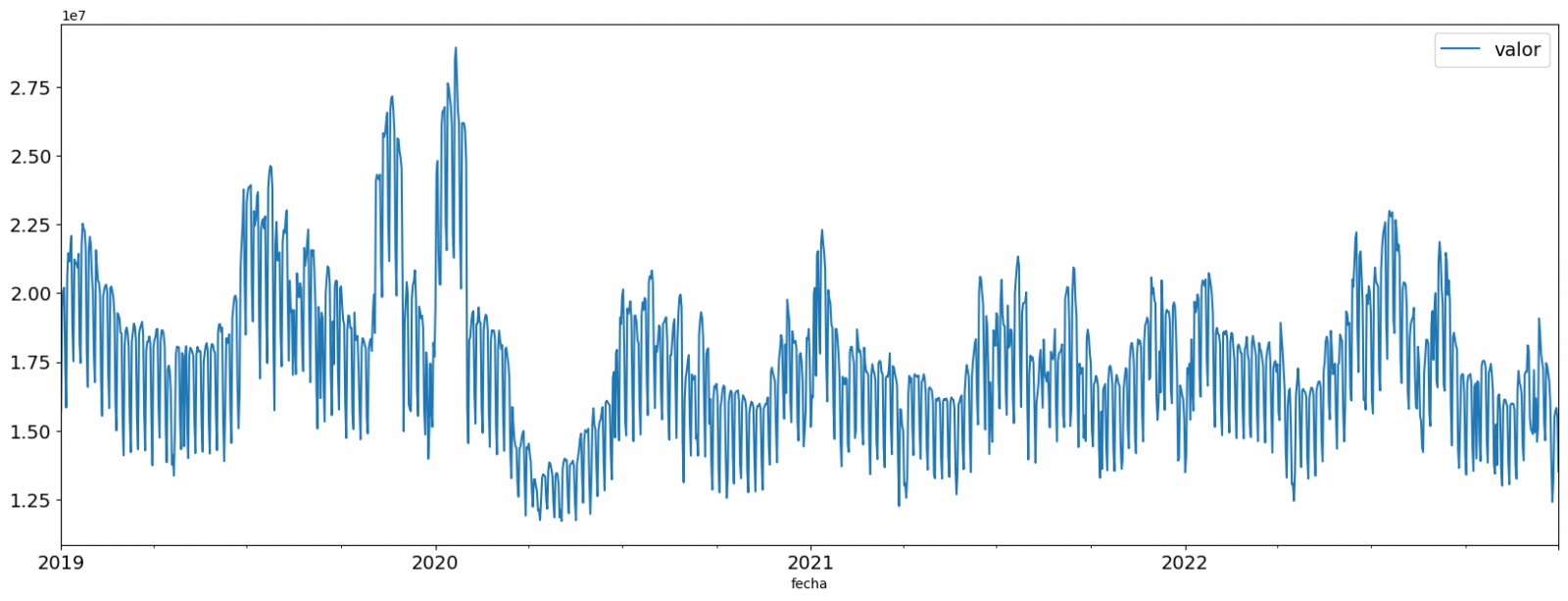
Figure 2. Time series of historical data after outliers have been processed.
If you want to know more about these processes, you can refer to the Practical Guide to Introduction to Exploratory Data Analysis.
4.3 Model training
This section can be found in point 3 of the Notebook.
First, we create within the data table the temporal attributes (year, month, day of the week, and quarter). These attributes are categorical variables that help ensure that the model is able to accurately capture the unique characteristics and patterns of these variables. Through the following box plot visualizations, we can see their relevance within the time series values.
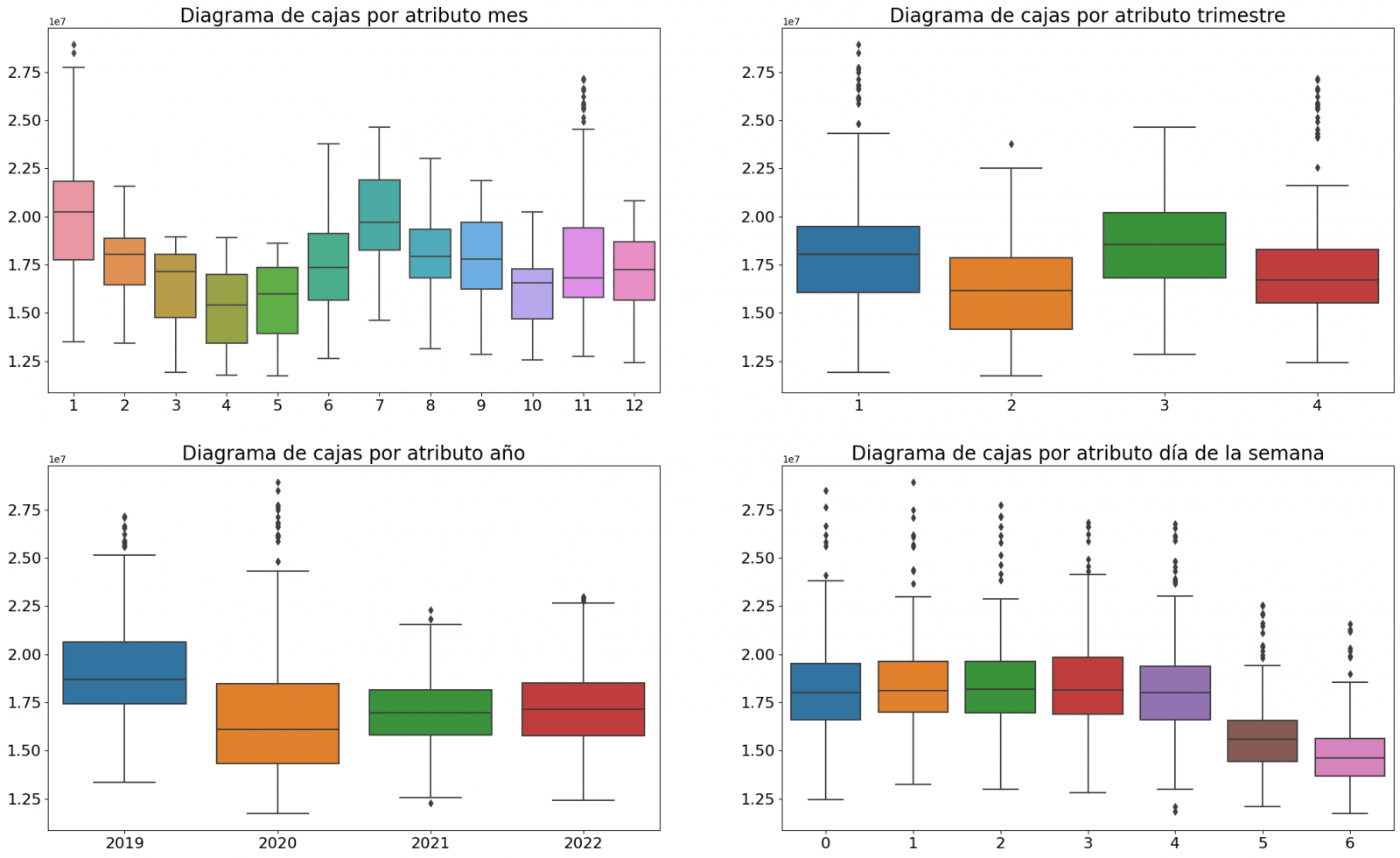
Figure 3. Box Diagrams of Generated Temporal Attributes
We can observe certain patterns in the charts above, such as the following:
- Weekdays (Monday to Friday) have a higher consumption than on weekends.
- The year with the lowest consumption values is 2020, which we understand is due to the reduction in service and industrial activity during the pandemic.
- The month with the highest consumption is July, which is understandable due to the use of air conditioners.
- The second quarter is the one with the lowest consumption values, with April standing out as the month with the lowest values.
Next, we divide the data table into training set and validation set. The training set is used to train the model, i.e., the model learns to predict the value of the target variable from that set, while the validation set is used to evaluate the performance of the model, i.e., the model is evaluated against the data from that set to determine its ability to predict the new values.
This splitting of the data is important to avoid overfitting, with the typical proportion of the data used for the training set being 70% and the validation set being approximately 30%. For this exercise we have decided to generate the training set with the data between "01-01-2019" to "01-10-2021", and the validation set with those between "01-10-2021" and "31-12-2022" as we can see in the following graph.
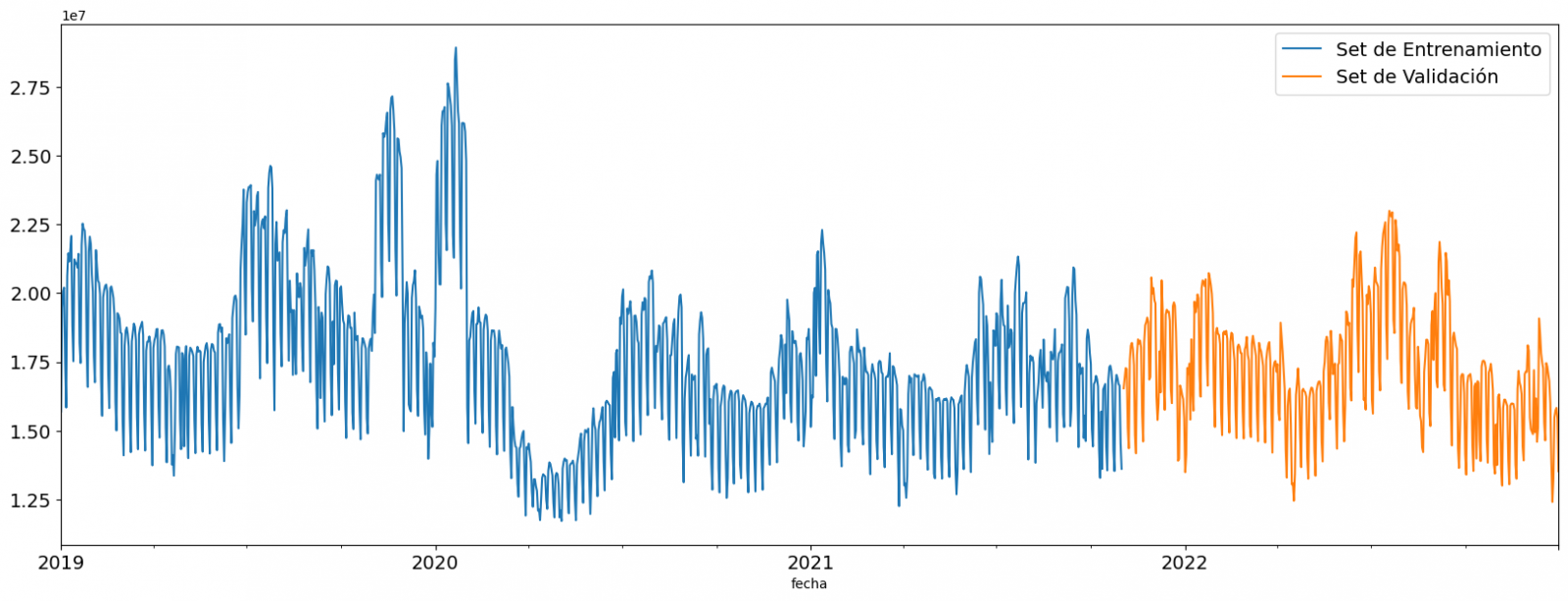
Figure 4. Historical data time series divided into training set and validation set
For this type of exercise, we have to use some regression algorithm. There are several models and libraries that can be used for time series prediction. In this exercise we will use the "Gradient Boosting" model, a supervised regression model that is a machine learning algorithm used to predict a continuous value based on the training of a dataset containing known values for the target variable (in our example the variable "value") and the values of the independent variables (in our exercise the temporal attributes).
It is based on decision trees and uses a technique called "boosting" to improve the accuracy of the model, being known for its efficiency and ability to handle a variety of regression and classification problems.
Its main advantages are the high degree of accuracy, robustness and flexibility, while some of its disadvantages are its sensitivity to outliers and that it requires careful optimization of parameters.
We will use the supervised regression model offered in the XGBBoost library, which can be adjusted with the following parameters:
- n_estimators: A parameter that affects the performance of the model by indicating the number of trees used. A larger number of trees generally results in a more accurate model, but it can also take more time to train.
- early_stopping_rounds: A parameter that controls the number of training rounds that will run before the model stops if performance in the validation set does not improve.
- learning_rate: Controls the learning speed of the model. A higher value will make the model learn faster, but it can lead to overfitting.
- max_depth: Control the maximum depth of trees in the forest. A higher value can provide a more accurate model, but it can also lead to overfitting.
- min_child_weight: Control the minimum weight of a sheet. A higher value can help prevent overfitting.
- Gamma: Controls the amount of expected loss reduction needed to split a node. A higher value can help prevent overfitting.
- colsample_bytree: Controls the proportion of features that are used to build each tree. A higher value can help prevent overfitting.
- Subsample: Controls the proportion of the data that is used to construct each tree. A higher value can help prevent overfitting.
These parameters can be adjusted to improve model performance on a specific dataset. It's a good idea to experiment with different values of these parameters to find the value that provides the best performance in your dataset.
Finally, by means of a bar graph, we will visually observe the importance of each of the attributes during the training of the model. It can be used to identify the most important attributes in a dataset, which can be useful for model interpretation and feature selection.
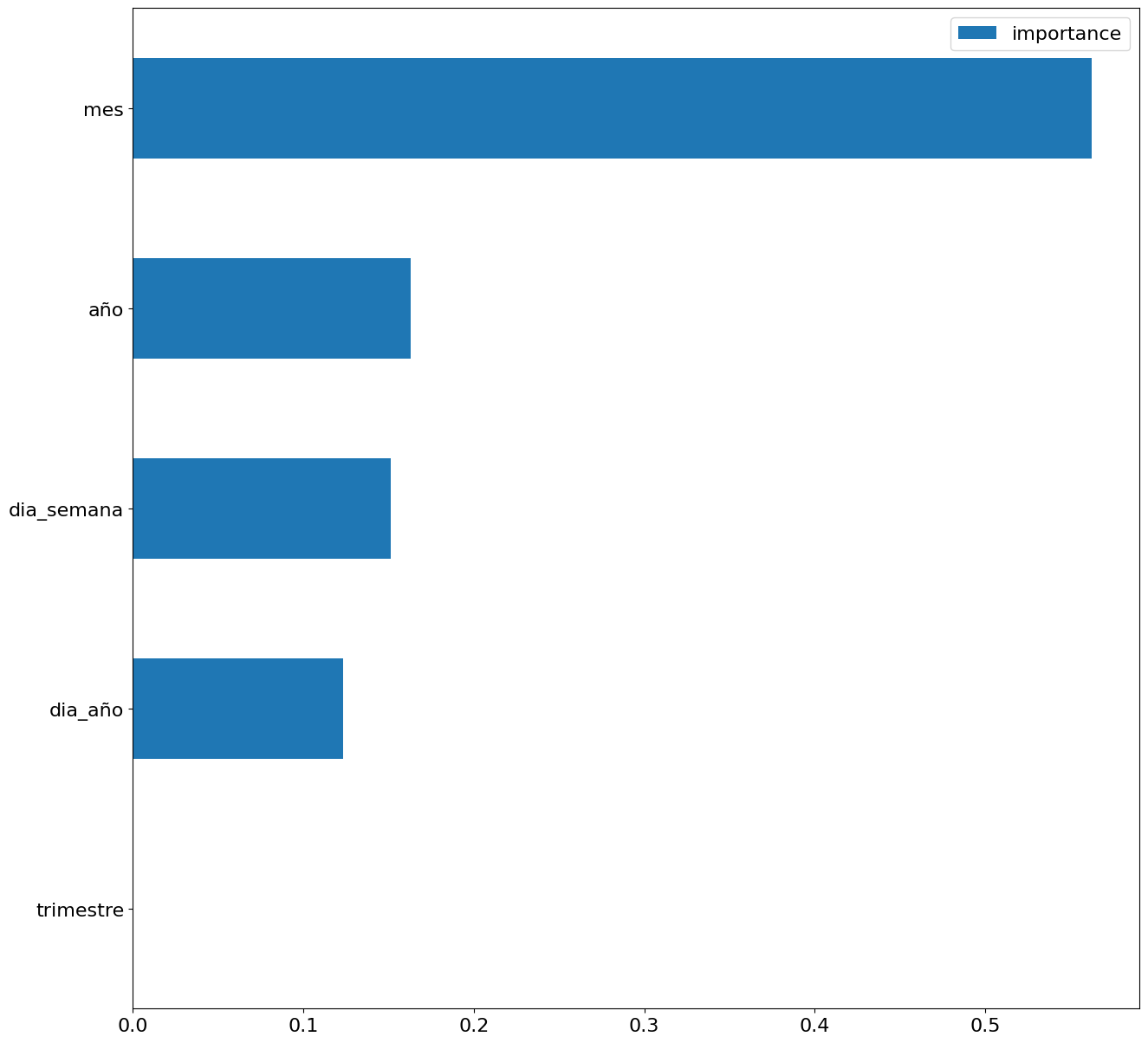
Figure 5. Bar Chart with Importance of Temporal Attributes
4.4 Model training
This section can be found in point 4 of the Notebook.
Once the model has been trained, we will evaluate how accurate it is for the known values in the validation set.
We can visually evaluate the model by plotting the time series with the known values along with the predictions made for the validation set as shown in the figure below.
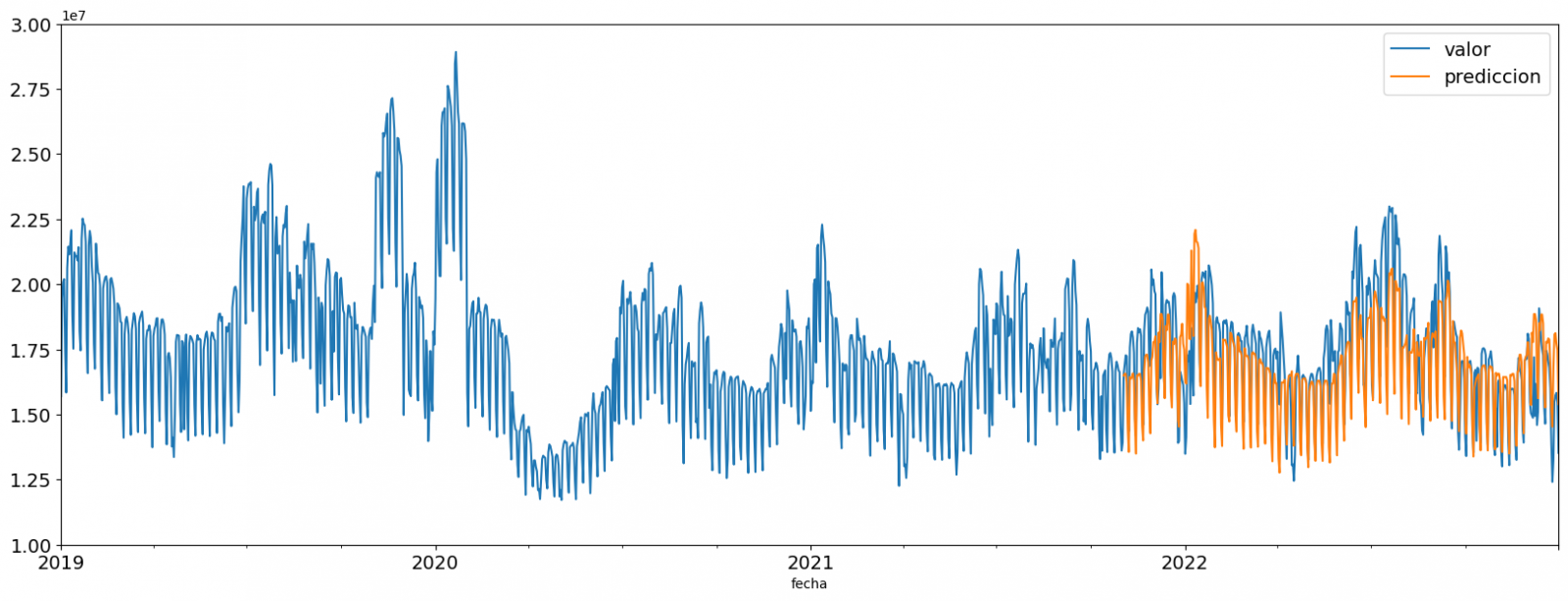
Figure 6. Time series with validation set data next to prediction data.
We can also numerically evaluate the accuracy of the model using different metrics. In this exercise, we have chosen to use the mean absolute percentage error (ASM) metric, which has been 6.58%. The accuracy of the model is considered high or low depending on the context and expectations in such a model, generally an ASM is considered low when it is less than 5%, while it is considered high when it is greater than 10%. In this exercise, the result of the model validation can be considered an acceptable value.
If you want to consult other types of metrics to evaluate the accuracy of models applied to time series, you can consult the following link.
4.5 Predictions of future values
This section can be found in point 5 of the Notebook.
Once the model has been generated and its MAPE = 6.58% performance has been evaluated, we will apply this model to all known data, in order to predict the unknown electricity consumption values for 2023.
First of all, we retrain the model with the known values until the end of 2022, without dividing it into a training and validation set. Finally, we calculate future values for the year 2023.

Figure 7. Time series with historical data and prediction for 2023
In the following interactive visualization you can see the predicted values for the year 2023 along with their main metrics, being able to filter by time period.
Improving the results of predictive time series models is an important goal in data science and data analytics. Several strategies that can help improve the accuracy of the exercise model are the use of exogenous variables, the use of more historical data or generation of synthetic data, optimization of parameters, ...
Due to the informative nature of this exercise and to promote the understanding of less specialized readers, we have proposed to explain the exercise in a way that is as simple and didactic as possible. You may come up with many ways to optimize your predictive model to achieve better results, and we encourage you to do so!
5. Conclusions of the exercise
Once the exercise has been carried out, we can see different conclusions such as the following:
- The maximum values for consumption predictions in 2023 are given in the last half of July, exceeding values of 22,500,000 MWh
- The month with the highest consumption according to the predictions for 2023 will be July, while the month with the lowest average consumption will be November, with a percentage difference between the two of 25.24%
- The average daily consumption forecast for 2023 is 17,259,844 MWh, 1.46% lower than that recorded between 2019 and 2022.
We hope that this exercise has been useful for you to learn some common techniques in the study and analysis of open data. We'll be back to show you new reuses. See you soon!
Documentación
1. Introduction
Visualizations are graphical representations of data that allow the information linked to them to be communicated in a simple and effective way. The visualization possibilities are very wide, from basic representations, such as line, bar or sector graphs, to visualizations configured on interactive dashboards.
In this "Step-by-Step Visualizations" section we are regularly presenting practical exercises of open data visualizations available in datos.gob.es or other similar catalogs. They address and describe in a simple way the stages necessary to obtain the data, perform the transformations and analyses that are relevant to, finally, enable the creation of interactive visualizations that allow us to obtain final conclusions as a summary of said information. In each of these practical exercises, simple and well-documented code developments are used, as well as tools that are free to use. All generated material is available for reuse in the GitHub Data Lab repository.
Then, and as a complement to the explanation that you will find below, you can access the code that we will use in the exercise and that we will explain and develop in the following sections of this post.
Access the data lab repository on Github.
Run the data pre-processing code on top of Google Colab.
2. Objetive
The main objective of this exercise is to show how to perform a network or graph analysis based on open data on rental bicycle trips in the city of Madrid. To do this, we will perform a preprocessing of the data in order to obtain the tables that we will use next in the visualization generating tool, with which we will create the visualizations of the graph.
Network analysis are methods and tools for the study and interpretation of the relationships and connections between entities or interconnected nodes of a network, these entities being persons, sites, products, or organizations, among others. Network analysis seeks to discover patterns, identify communities, analyze influence, and determine the importance of nodes within the network. This is achieved by using specific algorithms and techniques to extract meaningful insights from network data.
Once the data has been analyzed using this visualization, we can answer questions such as the following:
- What is the network station with the highest inbound and outbound traffic?
- What are the most common interstation routes?
- What is the average number of connections between stations for each of them?
- What are the most interconnected stations within the network?
3. Resources
3.1. Datasets
The open datasets used contain information on loan bike trips made in the city of Madrid. The information they provide is about the station of origin and destination, the time of the journey, the duration of the journey, the identifier of the bicycle, ...
These open datasets are published by the Madrid City Council, through files that collect the records on a monthly basis.
These datasets are also available for download from the following Github repository.
3.2. Tools
To carry out the data preprocessing tasks, the Python programming language written on a Jupyter Notebook hosted in the Google Colab cloud service has been used.
"Google Colab" or, also called Google Colaboratory, is a cloud service from Google Research that allows you to program, execute and share code written in Python or R on a Jupyter Notebook from your browser, so it does not require configuration. This service is free of charge.
For the creation of the interactive visualization, the Gephi tool has been used.
"Gephi" is a network visualization and analysis tool. It allows you to represent and explore relationships between elements, such as nodes and links, in order to understand the structure and patterns of the network. The program requires download and is free.
If you want to know more about tools that can help you in the treatment and visualization of data, you can use the report "Data processing and visualization tools".
4. Data processing or preparation
The processes that we describe below you will find them commented in the Notebook that you can also run from Google Colab.
Due to the high volume of trips recorded in the datasets, we defined the following starting points when analysing them:
- We will analyse the time of day with the highest travel traffic
- We will analyse the stations with a higher volume of trips
Before launching to analyse and build an effective visualization, we must carry out a prior treatment of the data, paying special attention to its obtaining and the validation of its content, making sure that they are in the appropriate and consistent format for processing and that they do not contain errors.
As a first step of the process, it is necessary to perform an exploratory analysis of the data (EDA), in order to properly interpret the starting data, detect anomalies, missing data or errors that could affect the quality of subsequent processes and results. If you want to know more about this process you can resort to the Practical Guide of Introduction to Exploratory Data Analysis
The next step is to generate the pre-processed data table that we will use to feed the network analysis tool (Gephi) that will visually help us understand the information. To do this, we will modify, filter and join the data according to our needs.
The steps followed in this data preprocessing, explained in this Google Colab Notebook, are as follows:
- Installation of libraries and loading of datasets
- Exploratory Data Analysis (EDA)
- Generating pre-processed tables
You will be able to reproduce this analysis with the source code that is available in our GitHub account. The way to provide the code is through a document made on a Jupyter Notebook that, once loaded into the development environment, you can easily run or modify.
Due to the informative nature of this post and to favour the understanding of non-specialized readers, the code is not intended to be the most efficient but to facilitate its understanding, so you will possibly come up with many ways to optimize the proposed code to achieve similar purposes. We encourage you to do so!
5. Network analysis
5.1. Definition of the network
The analysed network is formed by the trips between different bicycle stations in the city of Madrid, having as main information of each of the registered trips the station of origin (called "source") and the destination station (called "target").
The network consists of 253 nodes (stations) and 3012 edges (interactions between stations). It is a directed graph, because the interactions are bidirectional and weighted, because each edge between the nodes has an associated numerical value called "weight" which in this case corresponds to the number of trips made between both stations.
5.2. Loading the pre-processed table in to Gephi
Using the "import spreadsheet" option on the file tab, we import the previously pre-processed data table in CSV format. Gephi will detect what type of data is being loaded, so we will use the default predefined parameters.


5.3. Network display options
5.3.1 Distribution window
First, we apply in the distribution window, the Force Atlas 2 algorithm. This algorithm uses the technique of node repulsion depending on the degree of connection in such a way that the sparsely connected nodes are separated from those with a greater force of attraction to each other.
To prevent the related components from being out of the main view, we set the value of the parameter "Severity in Tuning" to a value of 10 and to avoid that the nodes are piled up, we check the option "Dissuade Hubs" and "Avoid overlap".

Dentro de la ventana de distribución, también aplicamos el algoritmo de Expansión con la finalidad de que los nodos no se encuentren tan juntos entre sí mismos.

Figure 3. Distribution window - Expansion algorithm
5.3.2 Appearance window
Next, in the appearance window, we modify the nodes and their labels so that their size is not equal but depends on the value of the degree of each node (nodes with a higher degree, larger visual size). We will also modify the colour of the nodes so that the larger ones are a more striking colour than the smaller ones. In the same appearance window we modify the edges, in this case we have opted for a unitary colour for all of them, since by default the size is according to the weight of each of them.
A higher degree in one of the nodes implies a greater number of stations connected to that node, while a greater weight of the edges implies a greater number of trips for each connection.

5.3.3 Graph window
Finally, in the lower area of the interface of the graph window, we have several options such as activating / deactivating the button to show the labels of the different nodes, adapting the size of the edges in order to make the visualization cleaner, modify the font of the labels, ...

Next, we can see the visualization of the graph that represents the network once the visualization options mentioned in the previous points have been applied.

Figure 6. Graph display
Activating the option to display labels and placing the cursor on one of the nodes, the links that correspond to the node and the rest of the nodes that are linked to the chosen one through these links will be displayed.
Next, we can visualize the nodes and links related to the bicycle station "Fernando el Católico". In the visualization, the nodes that have a greater number of connections are easily distinguished, since they appear with a larger size and more striking colours, such as "Plaza de la Cebada" or "Quevedo".

5.4 Main network measures
Together with the visualization of the graph, the following measurements provide us with the main information of the analysed network. These averages, which are the usual metrics when performing network analytics, can be calculated in the statistics window.

- Nodes (N): are the different individual elements that make up a network, representing different entities. In this case the different bicycle stations. Its value on the network is 243
- Links (L): are the connections that exist between the nodes of a network. Links represent the relationships or interactions between the individual elements (nodes) that make up the network. Its value in the network is 3014
- Maximum number of links (Lmax): is the maximum possible number of links in the network. It is calculated by the following formula Lmax= N(N-1)/2. Its value on the network is 31878
- Average grade (k): is a statistical measure to quantify the average connectivity of network nodes. It is calculated by averaging the degrees of all nodes in the network. Its value in the network is 23.8
- Network density (d): indicates the proportion of connections between network nodes to the total number of possible connections. Its value in the network is 0.047
- Diámetro (dmax ): is the longest graph distance between any two nodes of the res, i.e., how far away the 2 nodes are farther apart. Its value on the network is 7
- Mean distance (d):is the average mean graph distance between the nodes of the network. Its value on the network is 2.68
- Mean clustering coefficient (C): Indicates how nodes are embedded between their neighbouring nodes. The average value gives a general indication of the grouping in the network. Its value in the network is 0.208
- Related component: A group of nodes that are directly or indirectly connected to each other but are not connected to nodes outside that group. Its value on the network is 24
5.5 Interpretation of results
The probability of degrees roughly follows a long-tail distribution, where we can observe that there are a few stations that interact with a large number of them while most interact with a low number of stations.
The average grade is 23.8 which indicates that each station interacts on average with about 24 other stations (input and output).
In the following graph we can see that, although we have nodes with degrees considered as high (80, 90, 100, ...), it is observed that 25% of the nodes have degrees equal to or less than 8, while 75% of the nodes have degrees less than or equal to 32.

The previous graph can be broken down into the following two corresponding to the average degree of input and output (since the network is directional). We see that both have similar long-tail distributions, their mean degree being the same of 11.9
Its main difference is that the graph corresponding to the average degree of input has a median of 7 while the output is 9, which means that there is a majority of nodes with lower degrees in the input than the output.


The value of the average grade with weights is 346.07 which indicates the average of total trips in and out of each station.

The network density of 0.047 is considered a low density indicating that the network is dispersed, that is, it contains few interactions between different stations in relation to the possible ones. This is considered logical because connections between stations will be limited to certain areas due to the difficulty of reaching stations that are located at long distances.
The average clustering coefficient is 0.208 meaning that the interaction of two stations with a third does not necessarily imply interaction with each other, that is, it does not necessarily imply transitivity, so the probability of interconnection of these two stations through the intervention of a third is low.
Finally, the network has 24 related components, of which 2 are weak related components and 22 are strong related components.
5.6 Centrality analysis
A centrality analysis refers to the assessment of the importance of nodes in a network using different measures. Centrality is a fundamental concept in network analysis and is used to identify key or influential nodes within a network. To perform this task, you start from the metrics calculated in the statistics window.
- The degree centrality measure indicates that the higher the degree of a node, the more important it is. The five stations with the highest values are: 1º Plaza de la Cebada, 2º Plaza de Lavapiés, 3º Fernando el Católico, 4º Quevedo, 5º Segovia 45.